Message End Event
Ends the path and, as its final act, sends a message to another participant. Thick circle with a filled envelope.
The Message End Event merges 'finish' with 'notify': the last thing the path does is emit a message across a Message Flow — the confirmation to the customer, the response to the requesting system.
When to use and avoid
When to use
When the natural last step is informing the counterparty (confirmation, response, rejection notice).
As the reply of request/response collaborations started by a Message Start.
To guarantee the notification cannot be forgotten after the 'real' work.
When NOT to use
When the process continues after sending — that is an Intermediate Message Throw.
For internal notifications inside the same Pool — messages cross participants.
When nobody needs to know — a None End suffices.
Business example
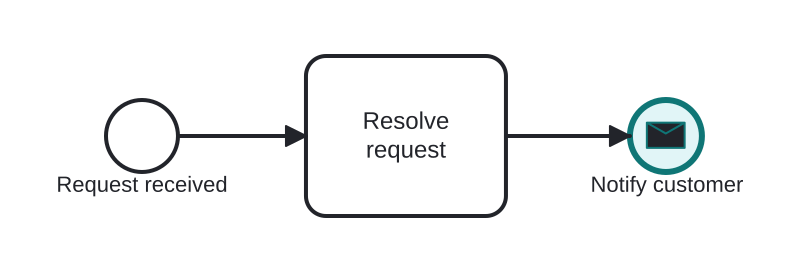
Confirming completion to the customer
Open this example in the HEFLO process editor and explore the diagram from the inside.
Open in the HEFLO editor →Step by step
- Resolve request finishes the work.
- The Message End Event (highlighted, filled envelope in thick circle) sends the resolution notice to the customer and simultaneously ends the path.
- Nothing follows — sending was the closing act.
Differences
Message End vs Send Task + None End
Functionally close; the Message End is more compact and makes the message the *definitive* final act. Use Send Task + end when sending needs activity features (retries, boundaries).
FAQ
Where does the message go?
Along the Message Flow to the target Pool — the collaboration diagram shows the recipient explicitly.
What if sending fails?
End events can't carry boundary events; if failure handling matters, use a Send Task before a plain end instead.