Intermediate Message Throw Event
Sends a message to another participant and immediately continues. Double thin circle with a filled (dark) envelope.
The Intermediate Message Throw Event is a notification in passing: when the token reaches it, the message is emitted across a Message Flow and the token moves on at once. It never waits for an answer.
When to use and avoid
When to use
To notify another participant mid-flow without pausing (e.g. “order accepted” to the customer).
When the send is instantaneous and needs no activity semantics.
As the reply half of a request/response conversation between Pools.
When NOT to use
When sending is a piece of work to manage (retry, escalate, measure) — use a Send Task.
When you must wait for the reply — pair with a catch event; the throw itself never waits.
For broadcasts to unknown listeners — use a Signal Throw.
Business example
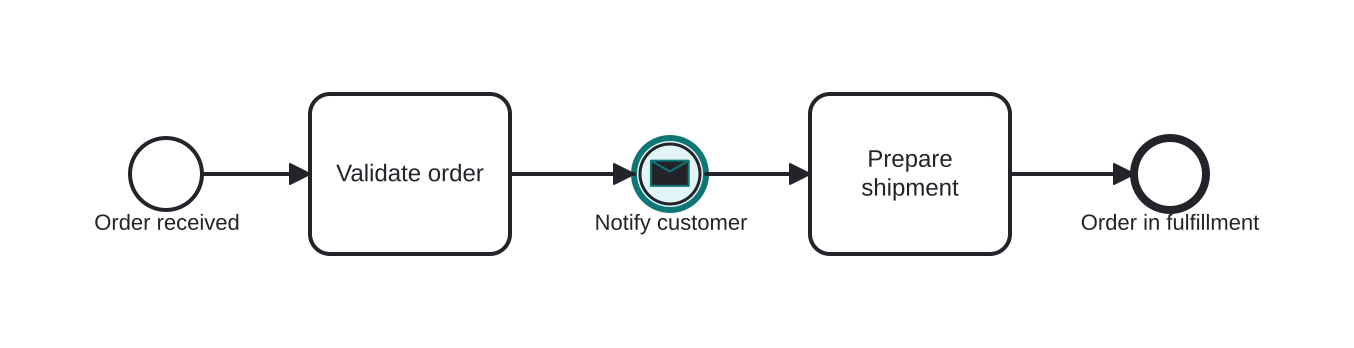
Notifying the customer that the order was accepted
Open this example in the HEFLO process editor and explore the diagram from the inside.
Open in the HEFLO editor →Step by step
- Validate order completes the checks.
- The Message Throw Event (highlighted, filled envelope) emits “order accepted” to the customer and the token continues immediately.
- Prepare shipment proceeds without waiting for any reply.
Differences
Message Throw vs Send Task
Identical message semantics, different granularity: the Send Task is an activity that can carry markers and boundary events; the Throw Event is a zero-duration emission. Prefer the event unless the send needs management.
FAQ
Does the throw event confirm delivery?
No — it completes on emission. If delivery matters, model the acknowledgment explicitly with a following catch event.
Can it send to multiple recipients?
A message targets one participant. To reach many unknown listeners, throw a Signal instead.