Message Boundary Event (non-interrupting)
Reacts to a message arriving while the activity runs, on a parallel path, without disturbing the activity. Double circle with an envelope, dashed border.
The non-interrupting Message Boundary Event lets a running activity absorb communications gracefully: the customer sends an update, a partner adds a document — a parallel handling path fires while the main work continues.
When to use and avoid
When to use
To process updates that enrich ongoing work (extra documents, comments) without restarting it.
To acknowledge mid-work communications while the activity proceeds.
When the same message may arrive multiple times during one activity.
When NOT to use
When the message invalidates the current work — use the interrupting variant so the activity is redone.
When the message can only arrive between activities — an intermediate catch on the path is simpler.
For scope-wide listening across many activities — a message event sub-process.
Business example
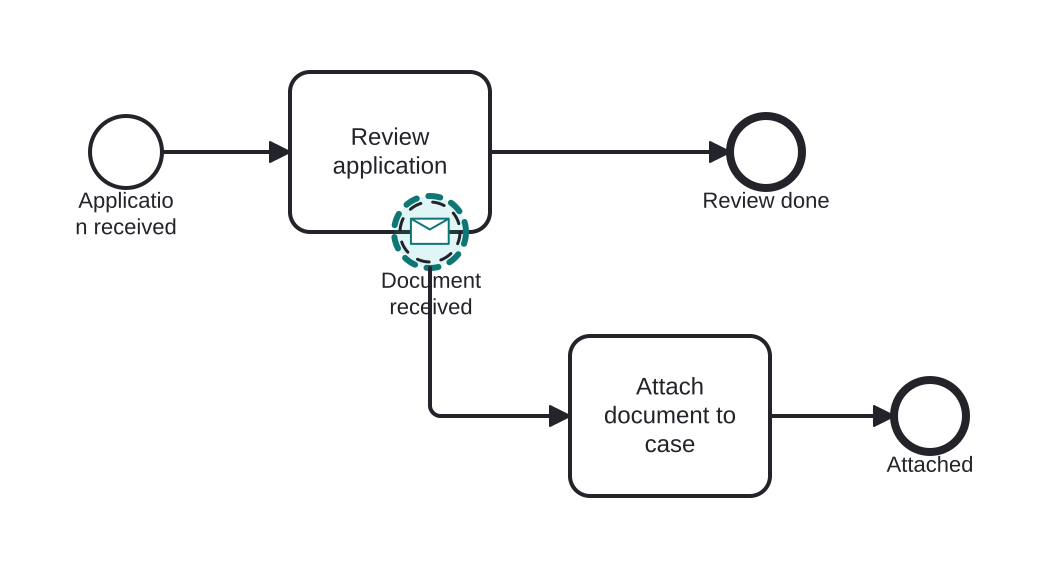
Customer adds documents during review
Open this example in the HEFLO process editor and explore the diagram from the inside.
Open in the HEFLO editor →Step by step
- Review application is in progress.
- The customer sends an additional document: the non-interrupting Message Boundary (highlighted, dashed) fires without stopping the review.
- Attach document to case runs in parallel and ends; the review continues with the enriched file.
Differences
Interrupting vs non-interrupting message boundary
Interrupting (solid): the message replaces the current work — activity cancelled, new path taken. Non-interrupting (dashed): the message complements the work — parallel path, activity continues.
FAQ
How does the message find the right activity instance?
By correlation (a business key in the message matched to the instance), like every message-receiving element.
Can it fire several times?
Yes — each matching message spawns another parallel occurrence while the activity is active.