Cancel End Event
Used only inside a Transaction Sub-Process: ends the transaction by cancelling it, which triggers compensation of completed steps. Thick circle with an X.
The Cancel End Event aborts the enclosing transaction deliberately: reaching it means *undo everything this transaction did*. The engine runs the compensation handlers of all completed inner activities, then leaves the transaction through its Cancel Boundary Event.
When to use and avoid
When to use
Inside transactions, on paths where the business decides to abort (customer gives up, prerequisite fails).
In all-or-nothing bookings/orders where partial results must never survive.
Together with a Cancel Boundary on the transaction to define the aftermath.
When NOT to use
Outside a Transaction Sub-Process — invalid anywhere else.
For failures — Error End (which skips the orderly compensation protocol).
When completed steps should be kept — just end the path normally.
Business example
Customer aborts the booking transaction
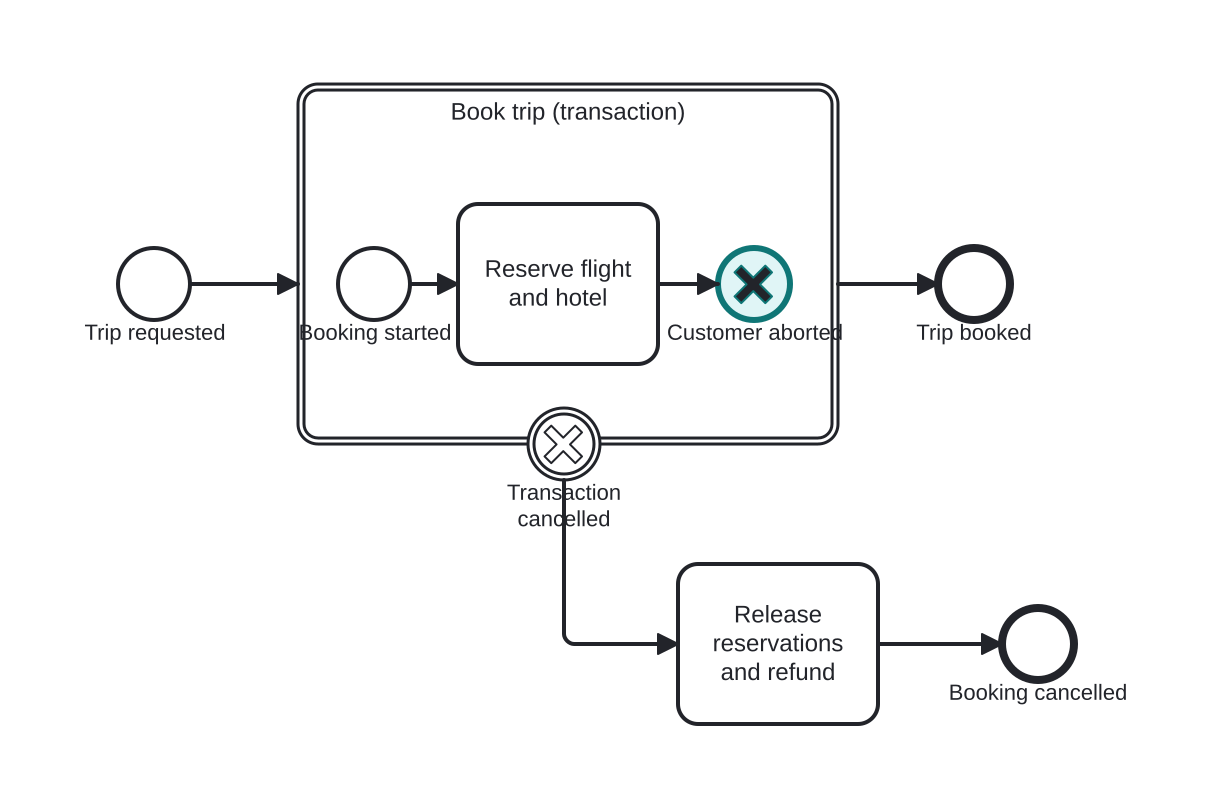
Open this example in the HEFLO process editor and explore the diagram from the inside.
Open in the HEFLO editor →Step by step
- Inside the Book trip transaction, reservations are made.
- The customer aborts: the Cancel End Event (highlighted) fires.
- Compensation undoes the completed reservations; the token exits through the Cancel Boundary to the refund path.
Differences
Cancel End vs Error End inside a transaction
Cancel = orderly abort: compensation runs, cancel boundary path follows. Error = failure: caught by an error boundary, no automatic compensation. Business gives-up → Cancel; technical/business failure → Error.
FAQ
What exactly gets compensated?
Every activity inside the transaction that had completed and declared a compensation handler — in reverse order.
Is a Cancel Boundary on the transaction mandatory?
In practice yes — without it the cancellation has nowhere to route the aftermath.