Conditional Start Event
Starts the process when a business condition becomes true (e.g. stock below minimum). Thin circle with a lined-paper icon.
The Conditional Start Event watches state instead of receiving stimuli: whenever the monitored condition flips to true, an instance starts. It expresses *policy* — “whenever X holds, act” — rather than a discrete trigger.
When to use and avoid
When to use
For threshold policies: stock below minimum, budget consumed above 90%, temperature out of range.
When the trigger is derived from data state, not from a message or schedule.
To make monitoring rules visible in the process landscape.
When NOT to use
When a discrete request arrives — that is a Message Start.
When the check runs on a schedule — a Timer Start plus a gateway is more explicit about *when* the check happens.
When no system actually monitors the condition — the model would promise behavior nobody implements.
Business example
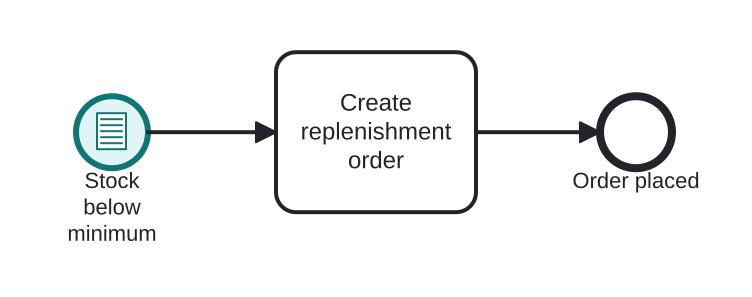
Replenishment triggered by low stock
Open this example in the HEFLO process editor and explore the diagram from the inside.
Open in the HEFLO editor →Step by step
- The Conditional Start Event (highlighted) monitors
stock < minimum; when it becomes true, an instance starts. - Create replenishment order reacts to the shortage.
- The instance ends with the order placed.
Differences
Difference between Conditional and Message triggers
A Message is a discrete communication aimed at the process; a Condition is observed state — nobody 'sends' anything. If a sender exists, prefer Message; if the trigger is a rule over data, Conditional is honest.
FAQ
Who evaluates the condition?
The engine (or an integrated monitoring component) re-evaluates it when relevant data changes. In practice, tool support varies — check yours before relying on it.
Does the instance start repeatedly while the condition stays true?
It fires on the transition to true, not continuously. A new instance requires the condition to become false and then true again.