Message Event Sub-Process Start (non-interrupting)
Starts an Event Sub-Process when a message arrives during the scope's execution — in the non-interrupting form (dashed border), the main flow keeps running.
A Message Start Event inside an Event Sub-Process lets a running scope react to communications without polluting the main flow. The non-interrupting variant (dashed circle border) is the common one: the handler runs *in parallel*, e.g. answering a status inquiry while the case continues.
When to use and avoid
When to use
To handle side conversations during a long-running case: status requests, document updates, complaints.
When the reaction must not disturb the main flow (non-interrupting).
When the same in-flight message can arrive at any point in the scope.
When NOT to use
When the message can only arrive at one specific point — an Intermediate Message Catch placed there is clearer.
When the message should cancel the current work — use the interrupting variant deliberately, or an interrupting boundary.
For messages that create new instances — that is a plain Message Start Event.
Business example
Answering status inquiries during claim handling
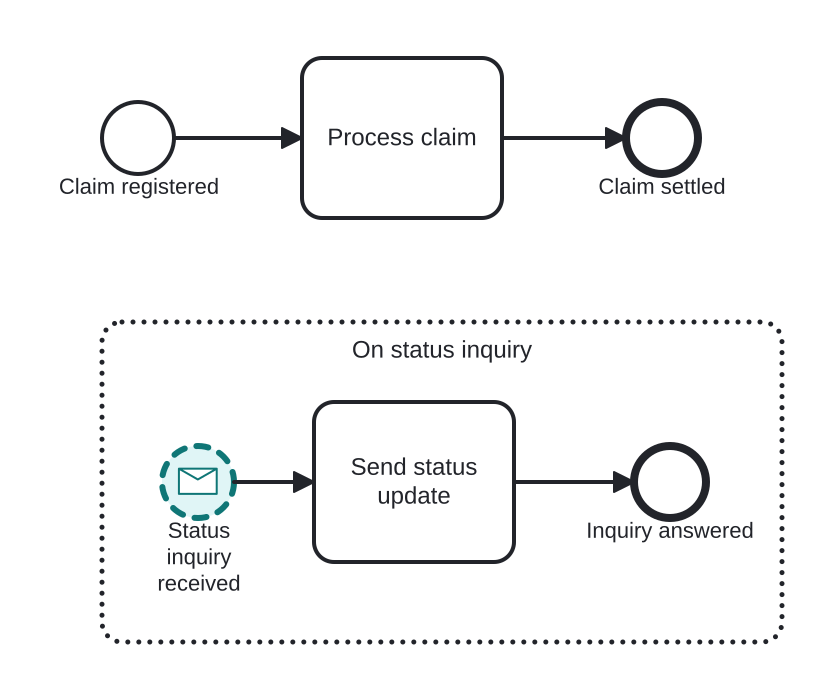
Open this example in the HEFLO process editor and explore the diagram from the inside.
Open in the HEFLO editor →Step by step
- The claim is being processed in the main flow.
- Whenever the customer sends a status inquiry, the non-interrupting Message Start (highlighted, dashed border) fires the event sub-process.
- Send status update replies — while the main claim processing continues untouched.
Differences
Interrupting vs non-interrupting event sub-process start
Interrupting (solid thin border): the scope's normal flow is aborted and the handler takes over. Non-interrupting (dashed border): the handler runs alongside the continuing flow. The border style is the whole difference — read it carefully.
FAQ
Can the handler fire multiple times?
Yes, in the non-interrupting form — each matching message starts another parallel handler occurrence while the scope is active.
How does this differ from a Message Boundary Event?
A boundary sits on one activity; the event sub-process listens for the whole scope. Also, the event sub-process keeps its handling flow visually contained.