Timer Boundary Event (interrupting)
A deadline on an activity: if the timer fires while the activity still runs, the activity is cancelled and the flow takes the timeout path. Double circle with a clock, solid border.
The interrupting Timer Boundary Event is the SLA guard of BPMN: attach it to any activity, define the limit, and model what happens when time runs out — the activity is aborted and the alternative path runs instead.
When to use and avoid
When to use
To enforce SLAs on approvals, replies and any waiting step.
To time-box work: “if not done in 3 days, reroute”.
On Receive Tasks / catch states, to abandon a wait that lasted too long.
When NOT to use
When the activity should continue while something extra happens (reminders) — use the non-interrupting variant.
For a pause on the normal path — Intermediate Timer.
When no one defined what the timeout path should do — the model would abort work with no policy.
Business example
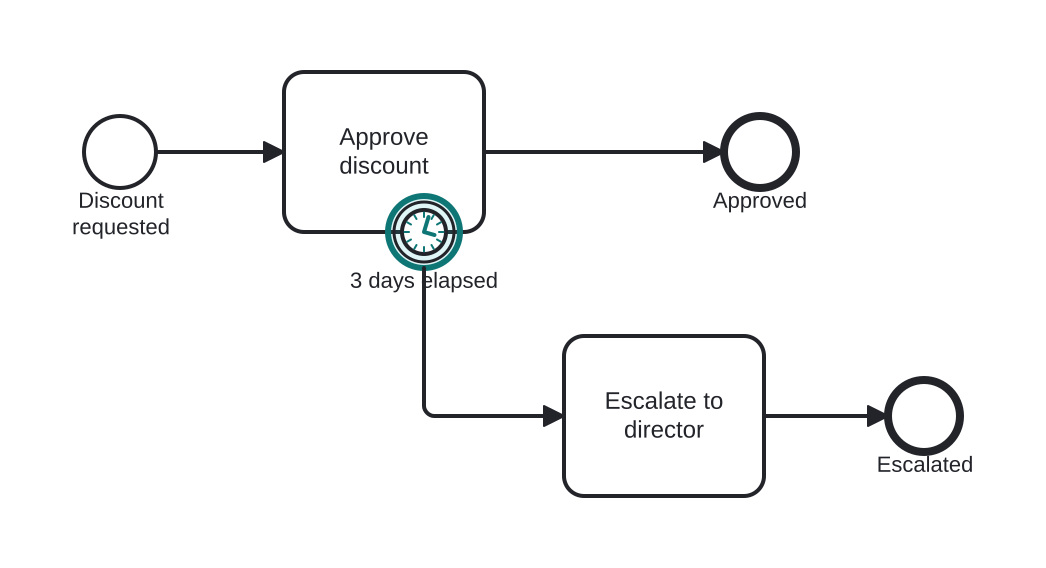
Approval must happen within 3 days
Open this example in the HEFLO process editor and explore the diagram from the inside.
Open in the HEFLO editor →Step by step
- Approve discount waits for the manager, heading to “Approved” if completed.
- If 3 days pass first, the interrupting Timer Boundary (highlighted) cancels the task.
- Escalate to director handles the timeout on the exception path.
Differences
Interrupting vs non-interrupting timer boundary
Interrupting (solid border): deadline — the activity dies and the flow reroutes. Non-interrupting (dashed border): checkpoint — a parallel action fires (reminder) and the activity keeps running.
FAQ
When does the timer start counting?
When the activity it is attached to starts. It is disarmed automatically if the activity completes first.
Can I attach several timer boundaries to one task?
Yes — e.g. a non-interrupting reminder at 2 days plus an interrupting cut-off at 5.