Parallel Multiple Start Event
Starts the process only when ALL of its defined triggers have occurred. Thin circle with a filled (outlined plus) pentagon icon.
The Parallel Multiple Start Event is the AND-join of triggers: the engine collects each stimulus and creates the instance only when the full set is present — for example, a signed contract and the down payment.
When to use and avoid
When to use
When work may only begin after several independent prerequisites are all in place.
To let prerequisites arrive in any order without modeling every permutation.
For compliance gates: document + approval + payment before onboarding starts.
When NOT to use
When any single trigger suffices — that is the (OR) Multiple Start.
When prerequisites arrive as one message — a single Message Start is enough.
When the correlation between the triggers is unclear — the engine must know they belong to the same future instance.
Business example
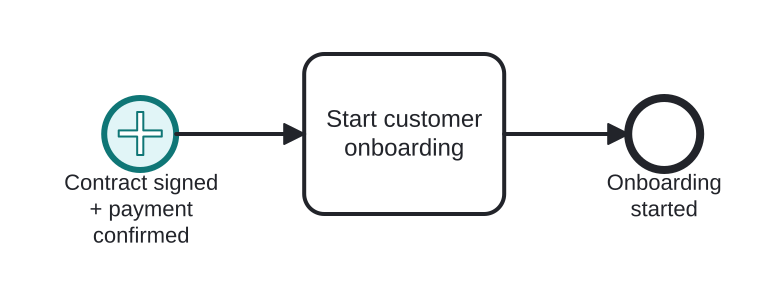
Onboarding starts after contract AND payment
Open this example in the HEFLO process editor and explore the diagram from the inside.
Open in the HEFLO editor →Step by step
- The Parallel Multiple Start Event (highlighted) waits for both triggers — the signed contract message and the payment confirmation — in any order.
- Only when both are in, Start customer onboarding runs.
- The instance ends with onboarding under way.
Differences
Parallel Multiple Start vs modeling prerequisites in the flow
You can also start on the first stimulus and use a Parallel Gateway + catches to wait for the rest. The Parallel Multiple Start is more compact but harder for readers unfamiliar with the notation; the explicit flow shows *where* each prerequisite is awaited.
FAQ
How does the engine know two triggers belong together?
By correlation data (e.g. the contract number present in both). Without a shared business key, the engine cannot assemble the trigger set.
How is it drawn differently from the OR Multiple?
Same pentagon, but for the parallel variant the pentagon is drawn with a plus-style outline (unfilled).