Multiple Start Event
Starts the process when ANY ONE of several defined triggers occurs. Thin circle with a hollow pentagon icon.
The Multiple Start Event bundles alternative triggers into one symbol: the process starts when the message arrives or the timer fires or the signal is caught — whichever happens first. It keeps a diagram with many entry stimuli compact.
When to use and avoid
When to use
When the same handling applies to several alternative triggers (e-mail request or portal request or phone request).
To avoid drawing multiple start events that all lead into the same flow.
When documenting that the process is reachable through more than one channel.
When NOT to use
When each trigger deserves a different initial treatment — separate typed starts are clearer.
When ALL triggers must occur — that is the Parallel Multiple Start.
When only one trigger exists — use the specific typed start.
Business example
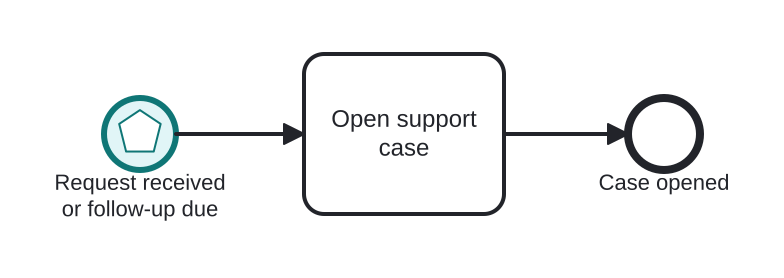
Support case opened by e-mail or by deadline
Open this example in the HEFLO process editor and explore the diagram from the inside.
Open in the HEFLO editor →Step by step
- The Multiple Start Event (highlighted, pentagon marker) bundles two triggers: a customer message *or* a scheduled follow-up timer.
- Whichever fires first, Open support case handles it the same way.
- The instance ends with the case opened.
Differences
Multiple vs Parallel Multiple
Multiple = OR: any one trigger starts the instance. Parallel Multiple = AND: the instance starts only after *all* triggers occurred. The hollow pentagon is OR; the filled pentagon is AND.
FAQ
Can I tell which trigger actually fired?
Engines expose the triggering event to the instance data, so the flow can branch on it right after the start if needed.
Is Multiple Start common in practice?
It's rare — most modelers prefer explicit separate starts. Use it when compactness genuinely helps the reader.