Intermediate Message Event
Pauses the flow until a specific message arrives from another participant. Double thin circle with a light (unfilled) envelope.
The Intermediate Message Catch Event models in-flight communication: the token stops and waits for a message that resumes an existing instance — unlike the Message Start Event, which creates a new one.
The message always crosses a Pool boundary (it comes from another participant) and is normally attached to a dashed Message Flow.
When to use and avoid
When to use
When the process must wait for an external communication before continuing (e.g. a payment confirmation).
For asynchronous handshakes between two Pools.
When the reception should resume a running instance, not create a new one.
When NOT to use
To start the process from a message — that is the Message Start Event.
When the wait is a tracked piece of work that needs timeouts or markers — a Receive Task fits better.
For communication inside the same Pool — use sequence flow and data.
Business example
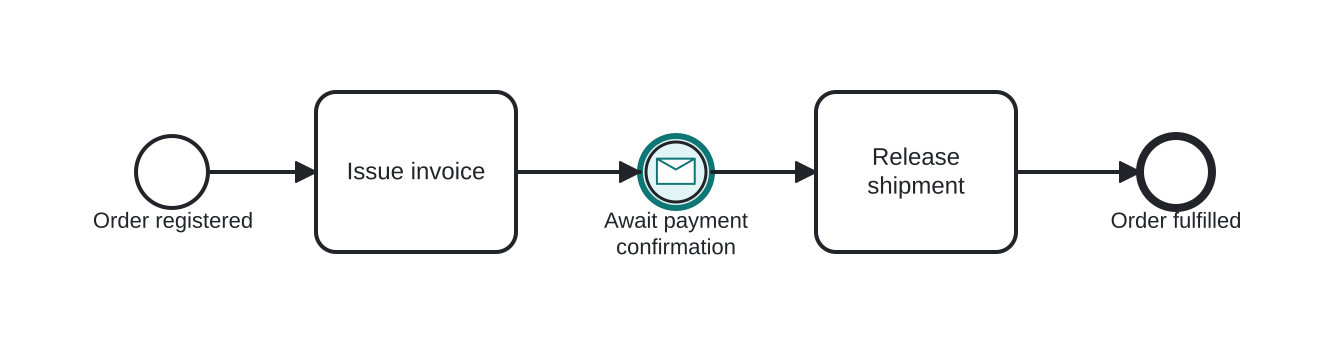
Waiting for the customer's payment confirmation
Open this example in the HEFLO process editor and explore the diagram from the inside.
Open in the HEFLO editor →Step by step
- The order is registered and Issue invoice sends the charge to the customer.
- The Intermediate Message Catch Event (highlighted) holds the token until the payment-confirmation message arrives.
- Once received, Release shipment runs and the process completes.
Without this event the supplier would ship before confirming payment — the catch imposes the synchronization point.
Differences
Message Throw Event vs Send Task
Both send a message, but the Send Task is an activity (loop/multi-instance markers, boundary events, work metrics) while the Throw Event is atomic and instantaneous. Task = manageable work; event = notification in passing.
Signal vs Message
A Message is addressed to a specific recipient (point-to-point between participants). A Signal is a broadcast — whoever listens reacts. 1-to-1 conversations → Message; publish/subscribe → Signal.
FAQ
How do catch and throw message events differ visually?
Catch shows the envelope in outline (light); throw shows it filled (dark). Both use the double thin circle of intermediate events.
Can a message event be attached to a task border?
Yes — a Message Boundary Event reacts to a message while the activity runs: interrupting cancels the activity; non-interrupting fires a parallel path.