Send Task
A task whose entire job is to send a message to an external participant. It completes as soon as the message is sent. Marked with a filled (dark) envelope icon.
The Send Task (Send Task) is the *activity* form of sending a message: the token arrives, the message is transmitted across a Message Flow to another Pool, and the token immediately moves on.
Semantically it is very close to the Intermediate Message Throw Event, but because it is an activity it can do things an event cannot: carry loop or multi-instance markers, have boundary events attached (a timer, an error) and appear in an activity-level view of work.
When to use and avoid
When to use
When notifying or requesting something from another participant is a step of work in its own right (e.g. Send resolution email, Send purchase order).
When the sending step needs boundary events (e.g. a timer to escalate if the send fails or hangs) or loop/multi-instance markers (send one message per item).
When you want the sending to appear in task-level reports and metrics, like any other activity.
When NOT to use
For a lightweight, instantaneous notification in the middle of the flow with no activity semantics — an Intermediate Message Throw Event is leaner.
For communication within the same Pool — messages exist between participants; inside a process use sequence flow and data.
When the step also *waits* for the reply — pair it with a Receive Task or message catch event; a Send Task never waits.
Business example
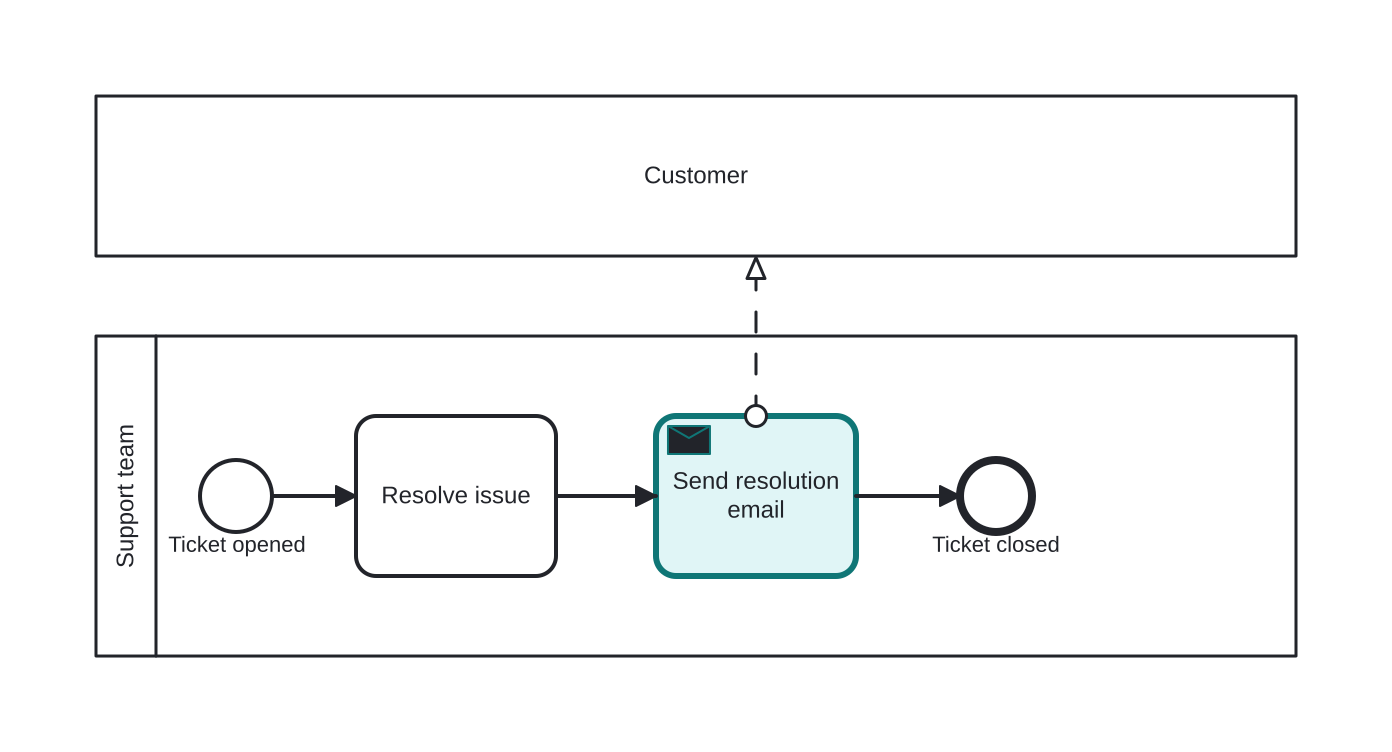
Sending the resolution email to the customer
Open this example in the HEFLO process editor and explore the diagram from the inside.
Open in the HEFLO editor →Step by step
- A support ticket is opened and the team works on it in Resolve issue.
- The Send Task “Send resolution email” (highlighted) transmits the resolution to the Customer Pool via the dashed message flow.
- The task completes as soon as the message is sent — the process does not wait for the customer to read it — and the ticket is closed.
The customer Pool is a black box: we see that they receive our message, not how they handle it.
Differences
Difference between a Send Task and an Intermediate Message Throw Event
Both send a message and move on, but the Send Task is an activity: it can carry loop/multi-instance markers, accept boundary events and show up in work reports. The Throw Event is atomic and instantaneous — pure notification. Use the task when sending is a manageable piece of work; use the event when it is just a signal in passing.
Difference between a Send Task and a Service Task
A Service Task performs general automated work (call an API, update a record) with request/response character. A Send Task specifically transmits a message to *another participant* and connects to a message flow. Choose by intent: integration step → Service; inter-participant communication → Send.
FAQ
Does a Send Task wait for a reply?
No — it completes as soon as the message is sent. To wait for the answer, follow it with a Receive Task or an Intermediate Message Catch Event.
Can a Send Task exist without a message flow?
In a collaboration diagram the message flow to the receiving Pool makes the communication explicit and is strongly recommended. If the other participant is not shown, the model loses the information about who receives the message.