Timer Boundary Event (non-interrupting)
Fires a parallel path on a schedule while the activity keeps running — the reminder pattern. Double circle with a clock, dashed border.
The non-interrupting Timer Boundary Event adds side actions to a running activity without disturbing it: send a reminder after 2 days, notify the requester weekly, log a checkpoint. With a cyclic timer it can fire repeatedly while the activity lives.
When to use and avoid
When to use
For reminders and nudges while a task sits in someone's queue.
For periodic status notifications during long-running activities.
To trigger checkpoint actions (metrics, partial reports) without touching the main work.
When NOT to use
When time running out should cancel the work — interrupting variant.
As the primary flow driver — it is an auxiliary channel.
When the side action itself changes the activity's outcome — that coupling deserves explicit modeling.
Business example
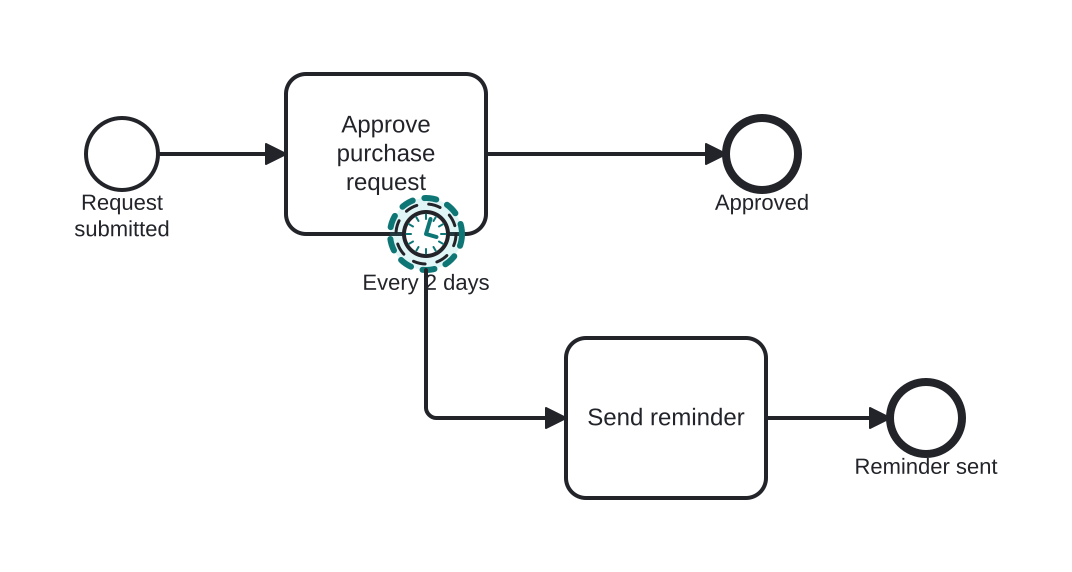
Reminding the approver every 2 days
Open this example in the HEFLO process editor and explore the diagram from the inside.
Open in the HEFLO editor →Step by step
- Approve purchase request waits for the approver.
- Every 2 days, the non-interrupting Timer Boundary (highlighted, dashed) fires — the task itself is untouched.
- Send reminder nudges the approver on a parallel path, then that path ends; approval continues normally.
Differences
Non-interrupting boundary vs separate reminder process
The boundary ties the reminder's lifetime to the activity: it arms when the activity starts and disarms when it ends — no orphan reminders. A separate process would need that bookkeeping done by hand.
FAQ
Can it fire more than once?
Yes, with a cyclic timer (e.g. R/P2D) it fires repeatedly for as long as the activity is active.
What happens to in-flight side paths when the activity completes?
Already-started side paths finish on their own; the timer just stops scheduling new ones.