Conditional Boundary Event
Fires when a business condition becomes true while the activity runs; interrupting or not. Double circle with a lined-paper icon.
The Conditional Boundary Event supervises an activity with a data rule: if the monitored state changes in a way that matters (customer self-served, request withdrawn, limit exceeded), the boundary reacts — cancelling the work (interrupting) or spawning a side action (non-interrupting).
When to use and avoid
When to use
To abandon work that became pointless (interrupting): the customer already solved it, the request was withdrawn.
To trigger side actions when data crosses a threshold during the activity.
When the terminating fact is state-based rather than an explicit message.
When NOT to use
When an explicit notification exists — a Message Boundary is more direct.
For time limits — Timer Boundary.
If the implementation cannot actually monitor the condition.
Business example
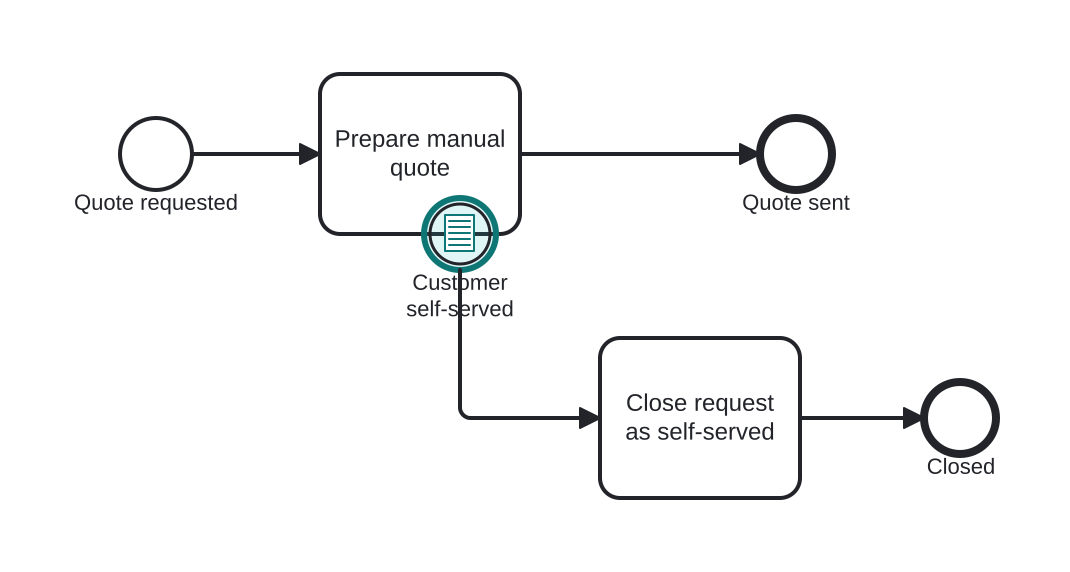
Abandoning a manual quote when the customer self-serves
Open this example in the HEFLO process editor and explore the diagram from the inside.
Open in the HEFLO editor →Step by step
- Prepare manual quote is under way.
- The customer completes the purchase online: the condition “order already placed” becomes true and the Conditional Boundary (highlighted) interrupts the task.
- Close request as self-served wraps up on the exception path.
Differences
Conditional vs Message boundary
If someone tells the process, it's a message; if the process observes it in data, it's a condition. Conditions shine when the fact appears in systems silently.
FAQ
When is the condition first evaluated?
When the activity starts (arming the boundary). Per spec, if it is already true at that moment, the event fires immediately.
Interrupting or not — which is typical?
Both are common: interrupting for 'work became pointless', non-interrupting for threshold side-actions.