Terminate End Event
Ends the ENTIRE process instance immediately: every token, in every parallel branch, is destroyed. Thick circle with a filled solid disc.
The Terminate End Event is the emergency stop: reaching it doesn't just end one path — it aborts the whole instance, killing all parallel work instantly, with no compensation and no further handling. Powerful, and therefore to be used sparingly and consciously.
When to use and avoid
When to use
When one branch's outcome makes all other parallel work meaningless (bidder disqualified, fraud confirmed).
For hard aborts demanded by policy, where lingering branches would be wrong.
In sub-processes, to kill the sub-process scope entirely from one branch.
When NOT to use
As a routine ending — the None End is the default; terminate is exceptional.
When parallel branches should finish naturally — their work may matter.
When completed steps require undoing — terminate skips compensation; orchestrate it explicitly first.
Business example
Disqualification aborts the parallel evaluation
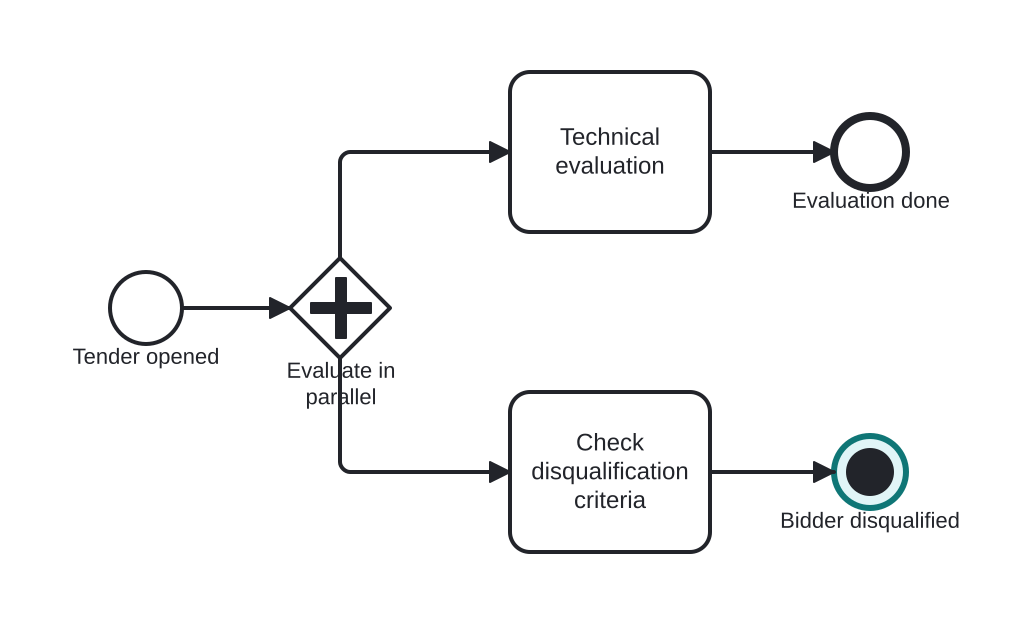
Open this example in the HEFLO process editor and explore the diagram from the inside.
Open in the HEFLO editor →Step by step
- The tender splits in parallel: Technical evaluation and Check disqualification criteria run simultaneously.
- The check finds a disqualifying issue and reaches the Terminate End Event (highlighted, solid disc).
- The whole instance stops instantly — the technical evaluation is aborted mid-work, not waited for.
Differences
Terminate End vs None End
None ends one path; parallel tokens live on and the instance closes when all finish. Terminate ends the instance *now*, killing every token. If you must guarantee nothing else keeps running — that's terminate.
FAQ
Does terminate trigger compensation or error handling?
No. It is an immediate hard stop — no handlers run. If cleanup matters, model it before the terminate.
What is its reach inside a sub-process?
It terminates the sub-process scope (all its tokens); the parent then continues after the sub-process normally.