User Task
An activity performed by a person with the support of a software system — typically a form in a task list. The process engine assigns the work to a user and waits for its completion. Marked with a small person icon.
The User Task (User Task) represents human work assisted by software. When the token arrives, the engine creates an item in a user's (or role's/group's) task inbox and waits until the person completes the work — usually by filling in a form.
It is the most common activity in automated approval, review and data-entry processes, because it combines human judgment with system control: deadlines, reassignment, escalation and structured data capture.
When to use and avoid
When to use
When a person must review, decide or enter data through a system interface (e.g. Approve request, Review contract).
When you need the engine to control deadlines, reassignment and escalation over human work.
When the data produced by the person feeds later decisions in the process (gateways).
When NOT to use
For fully automated work with no human involvement — use a Service Task.
For human work done outside any system, with no form and no engine control — use a Manual Task.
Just to receive a message — use a Receive Task or a message event instead.
Business example
Vacation request approval
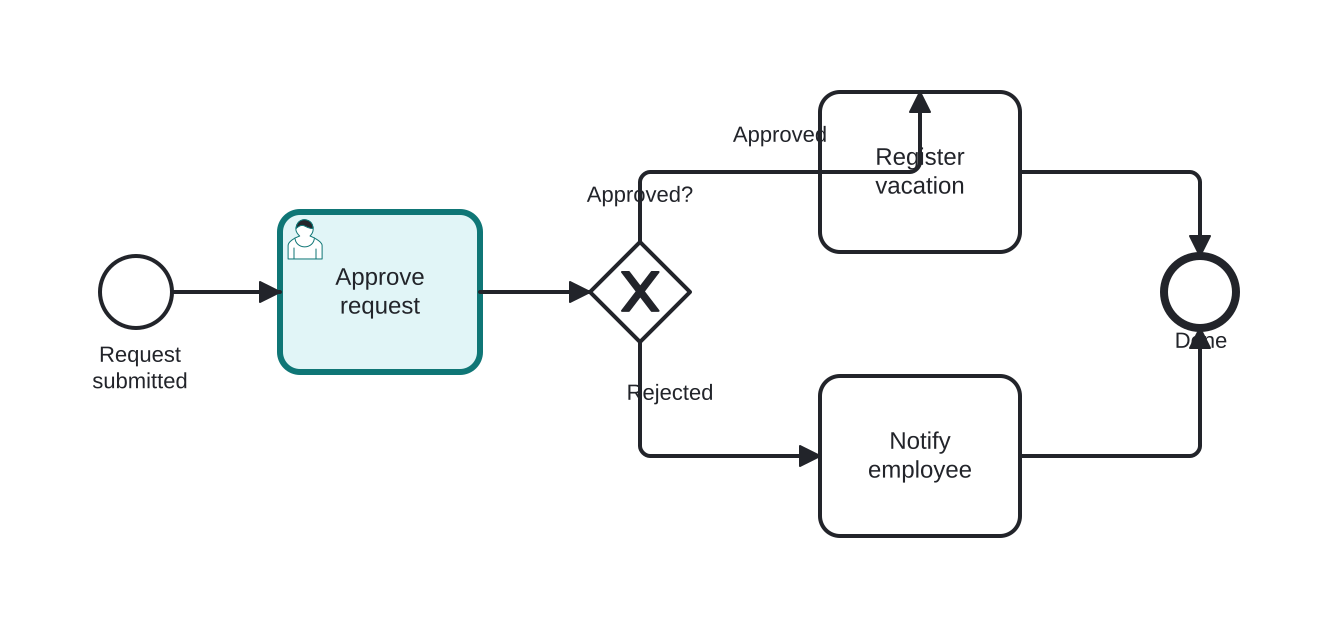
Open this example in the HEFLO process editor and explore the diagram from the inside.
Open in the HEFLO editor →Step by step
- The process starts when an employee submits a vacation request.
- The User Task “Approve request” (highlighted) lands in the manager's task inbox; the manager opens the form and decides.
- The Exclusive Gateway evaluates the decision: if Approved, the flow continues to Register vacation; if Rejected, it goes to Notify employee.
- Both paths converge at the end of the process.
The user task is the point where human judgment enters the flow — everything else is orchestrated by the system.
Differences
Difference between a User Task and a Manual Task
The User Task is system-assisted: the engine delivers the work, controls the deadline and collects data. The Manual Task is human work performed outside any system (e.g. “file the physical document”) — the engine neither controls it nor knows when it finishes. Use User when there is a form/system; Manual when the work is purely offline.
FAQ
How does the engine know who to assign the User Task to?
Assignment is defined on the task by user, role, group or expression. Tools like HEFLO let you set the responsible party plus reassignment and deadline-based escalation rules.
Can a User Task have a deadline?
Yes. It is common to attach a Timer Boundary Event to the task to escalate or reroute the flow when the deadline expires.