Sequential Multi-Instance Marker
The marker (≡ three horizontal bars) that runs one instance of the activity per collection item, one after another.
Sequential Multi-Instance walks the collection in order: the next item starts only when the previous finished. Use it when order matters, when a shared resource can't be hammered in parallel, or when each step's result should inform the next.
When to use and avoid
When to use
For ordered chains: hierarchical approval levels, ordered document processing.
To throttle load on people or systems that must not receive everything at once.
When early items can make later ones unnecessary (stop on first rejection).
When NOT to use
When items are independent and time matters — parallel MI.
When repetition is condition-based — loop marker.
When strict ordering is an illusion — don't serialize without a reason.
Business example
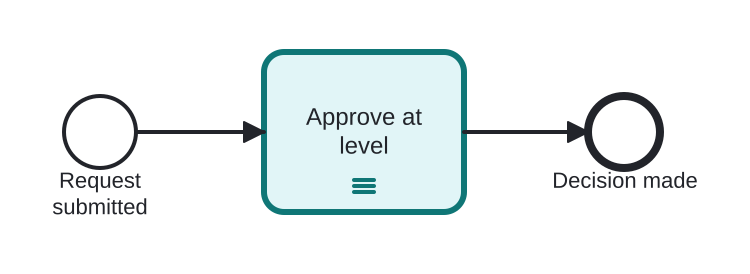
Approval levels one at a time
Open this example in the HEFLO process editor and explore the diagram from the inside.
Open in the HEFLO editor →Step by step
- Approve at level (highlighted, ≡ marker) iterates the approval chain: supervisor, then manager, then director.
- Each level starts only after the previous approved; a rejection stops the sequence early via the completion condition.
- After the last needed level, the flow continues with the final decision.
Differences
Sequential MI vs Loop
Both run one-at-a-time, but sequential MI iterates a known collection (cardinality fixed at start), while loop repeats under a condition with unknown count. Items → MI; condition → loop.
FAQ
Can a rejection stop the remaining items?
Yes — the completionCondition is evaluated after each instance; when true, remaining iterations are skipped.
Parallel and sequential MI on the same activity?
No — isSequential is a single flag; pick one behavior per activity.