Manual Task
Work performed by a person entirely outside any software system — the process engine cannot manage, track or complete it. Marked with a hand icon.
The Manual Task (Manual Task) documents human work that happens beyond the reach of the engine: replacing a physical part, delivering a package, filing a paper document. The spec defines it precisely as a task *not* managed by any business process engine.
Its value is documentary honesty: the process genuinely includes this offline step, so the model shows it — even though the engine can only pass through it (or wait for someone to confirm it happened, depending on the tool).
When to use and avoid
When to use
For physical-world work: install equipment, deliver goods, sign a paper form, archive a document.
When the model must faithfully document the end-to-end process, including steps no system touches.
When a person performs the work without any system interface — not even a mobile form.
When NOT to use
When the person interacts with a system (form, app, task list) — that is a User Task.
In heavily automated models where the offline step is irrelevant detail — consider omitting it or absorbing it into a neighboring activity.
To model waiting for something to happen — use events (timer, message, condition) for waiting semantics.
Business example
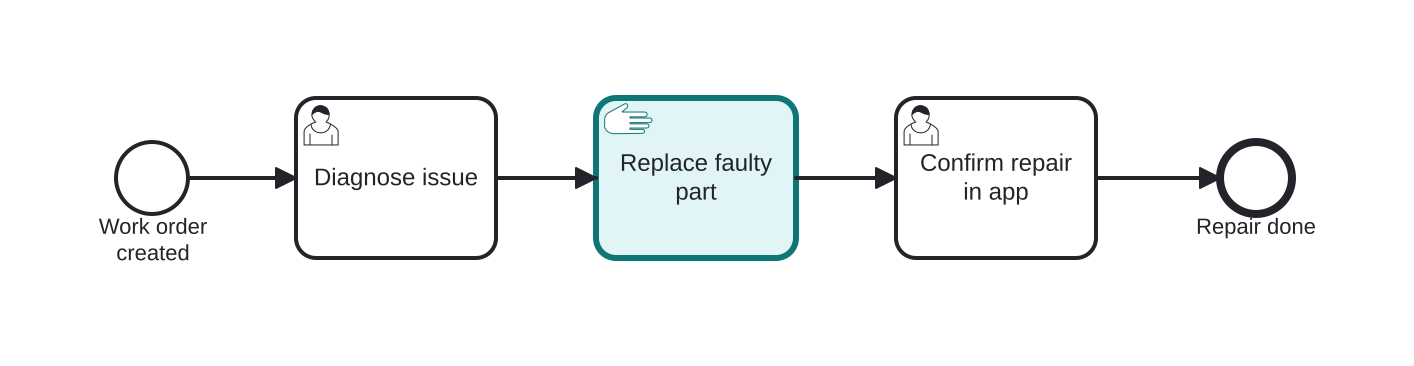
Field service: replacing a physical part
Open this example in the HEFLO process editor and explore the diagram from the inside.
Open in the HEFLO editor →Step by step
- A work order is created and the technician performs Diagnose issue using the service app (a User Task — system-assisted).
- The Manual Task “Replace faulty part” (highlighted) is pure physical work: no system mediates the replacement itself.
- Back in the app, Confirm repair in app (User Task) records the outcome, and the process ends.
Notice the pattern: manual work sandwiched between user tasks is how real field processes keep engine tracking around offline steps.
Differences
Difference between a Manual Task and a User Task
The User Task is human work *mediated by a system*: the engine assigns it, tracks it and collects its data. The Manual Task is human work *outside* any system: the engine has no visibility into it. If there is a form, an app or a task list involved — it is a User Task.
FAQ
How does the engine handle a Manual Task at runtime?
Engine behavior varies: some treat it as a pass-through (documented but not executed), others create a simple check-off so someone confirms the offline work happened. Check your tool's semantics before relying on either.
Should I model every offline step as a Manual Task?
Only the ones that matter to understanding or compliance. Trivial physical actions are usually absorbed into the neighboring activity's description to keep the diagram readable.