Data Object
Represents information flowing through the process — a document, record or data set an activity produces or consumes. It documents data; it never changes the flow. Sheet-of-paper shape with a folded corner.
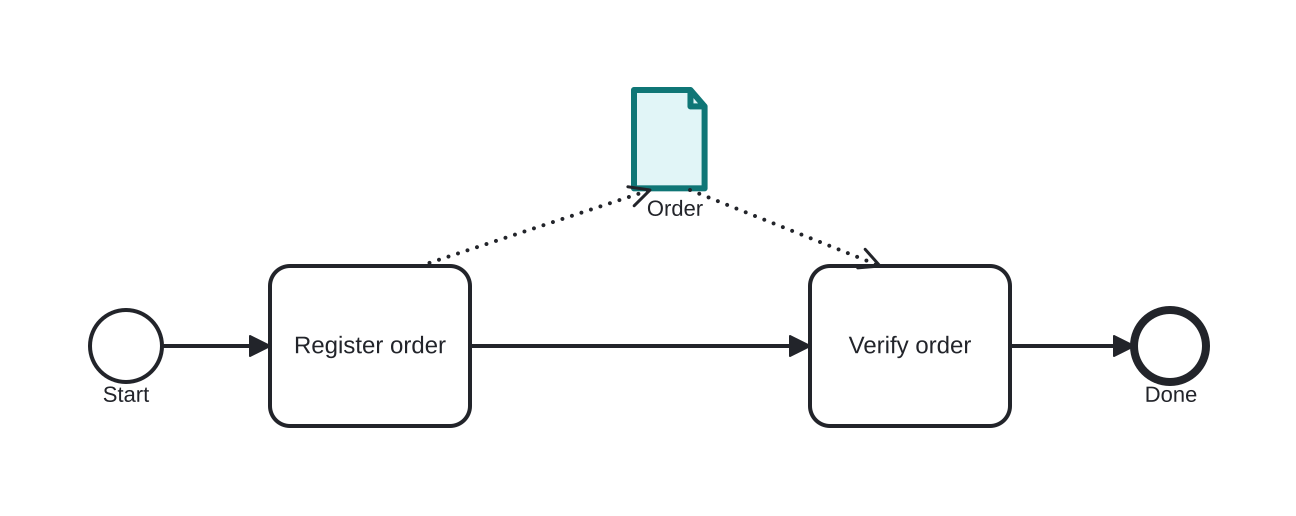
The Data Object shows which information activities use or produce: connected by dotted associations, it makes explicit — for instance — the Order created by one task and consumed by the next. It can carry a state in brackets (Order [draft] → Order [approved]) to show the artifact's lifecycle.
A data object lives only within the process instance (it is volatile). For information that persists beyond the instance, use a Data Store.
When to use and avoid
When to use
To make visible the document/record a step creates or requires.
To show a data item's state changes across the flow.
Where showing information genuinely improves understanding.
When NOT to use
For data persisting beyond the instance — Data Store.
To influence routing — data objects have no effect on sequence flow; gateways do that.
Everywhere: annotating every datum clutters the diagram fast.
Business example
An order produced and consumed between tasks
Open this example in the HEFLO process editor and explore the diagram from the inside.
Open in the HEFLO editor →Step by step
- Register order produces the Data Object “Order” (highlighted) via the dotted output association.
- Verify order consumes the same object through its input association.
- The solid sequence flow is untouched — the data object documents, never routes.
Differences
Data Object vs Data Store
Data Object: volatile, scoped to the running instance. Data Store: persistent repository (database, archive) that outlives instances and is shared between them. In transit → object; durable → store.
FAQ
Do data objects affect process execution?
No — they are documentation. To route on data, put expressions on gateway flows.
How do I show a list of items?
Mark the data object as a Collection — three vertical bars — meaning a set of instances of the item.