Association
The dotted line that attaches artifacts — text annotations, data objects — to flow elements. Purely documentary; the token never travels it.
The Association is the glue of the documentation layer: it links a text annotation to the task it explains, a data object to the activities that produce/consume it, a compensation handler to its boundary event. Directional variants (with an open arrowhead) show data direction; the plain dotted line just declares 'these belong together'.
When to use and avoid
When to use
To connect text annotations to the elements they describe.
To wire data objects to producers/consumers (as data associations).
To bind a compensation handler to its boundary event — its one semantically loaded use.
When NOT to use
To carry the token — associations are not sequence flows.
Between participants — not a communication channel.
In place of proper flow modeling when order actually matters.
Business example
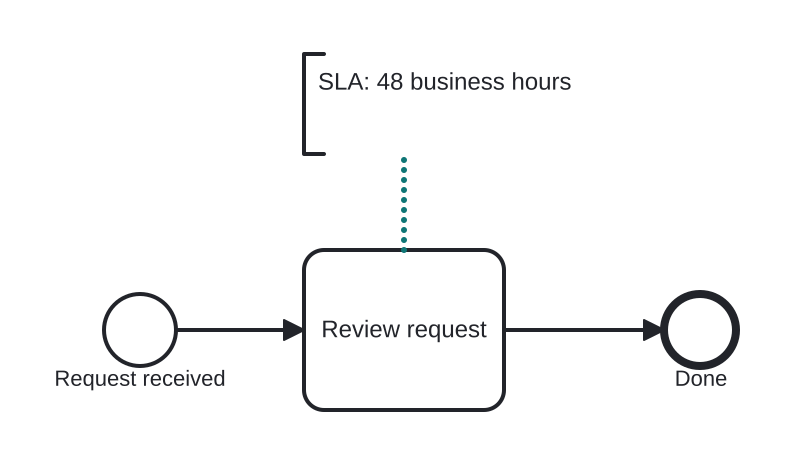
Attaching an SLA note to a task
Open this example in the HEFLO process editor and explore the diagram from the inside.
Open in the HEFLO editor →Step by step
- The annotation “SLA: 48 business hours” describes Review request.
- The Association (highlighted, dotted) declares that link — pure documentation.
- Execution ignores it entirely; the reader doesn't.
Differences
Association vs Sequence/Message Flow
Three line styles, three meanings: solid = token order (sequence), dashed = inter-participant message, dotted = documentation attachment (association). Mixing them up changes the model's meaning entirely.
FAQ
When does an association carry real semantics?
Linking a compensation boundary event to its handler — there it defines actual behavior. Everywhere else it is documentation.
Can associations be directional?
Yes — One or Both directions add open arrowheads, typically used for data read/write direction.