ERP vs BPM Platform: Where Should Process Logic Live?

If your company already runs an ERP, asking why you would need a BPM platform on top of it is a fair question.
The answer hinges on a distinction that gets overlooked surprisingly often: managing business records and managing business processes are two different jobs. An ERP is usually the right home for master data, transactions, documents, financial records, inventory, and purchasing — the official information a company runs on. The workflow around those records is another matter. Approvals, deadlines, handoffs, exceptions, rework, and day-to-day decisions tend to change far more often than the ERP core should.
None of this means BPM replaces the ERP. In most architectures, BPM carries the workflow while the ERP remains the system of record: the ERP keeps the official information reliable, and the BPM platform governs how work moves across people, rules, tasks, and process versions.
This article walks through both roles and offers a practical way to decide where process logic belongs.
ERP as the System of Record
An ERP exists to keep the company's official business information trustworthy. It holds the records the organization depends on to operate, report, audit, and decide: master data, financial postings, purchase orders, invoices, inventory movements, customer and vendor records, employee data, cost centers, materials, contracts. These objects demand consistency, validation, traceability, and strong transactional control.
So the ERP deserves respect in the architecture. For many companies it is the single most important system in the landscape.
Trouble starts when the ERP is also expected to manage every detail of how work flows before, around, and after those records exist. A transaction belongs in the ERP — but the path that leads to it may involve several people, multiple departments, business rules, deadlines, exceptions, and layered approval routes.
Put simply: keep the ERP as the trusted place for business records, but recognize that not every piece of process logic has to live inside it.
BPM as the Process Execution Layer
A BPM platform manages how work moves from one step to the next. Rather than focusing on the final record, it focuses on the flow itself: who does what, in which order, under which rules, against which deadlines, and what happens when something goes off track.
That flow is where process logic lives. Approval paths, task assignments, handoffs between departments, reminders, escalations, rework loops, exception handling, process versions — these aren't technical footnotes. They describe how the organization actually operates.
A BPM platform makes that logic visible and governed. Processes can be modeled, documented, executed, monitored, and improved without burying every rule in custom code, local procedures, email threads, or informal workarounds.
Again, this doesn't displace the ERP. The ERP stays responsible for reliable business records, and the BPM platform runs the workflow that creates, validates, enriches, approves, or follows up on them.
Do Users Need to Operate Two Systems?
A common worry when adding a BPM platform: will users now juggle two systems?
Sometimes they will touch both, yes. That isn't the same as duplicated work, though. What matters is whether each system has a clear job. The BPM platform guides the workflow — assigning tasks, collecting information, controlling deadlines, showing what comes next. The ERP keeps the official record, applies core validations, and stores the transaction once the required information is ready.
In a well-designed architecture, BPM isn't a second place to control the same thing. It's the layer that helps the right information reach the right system through the right process. Avoiding multiple systems at any cost was never the point; avoiding multiple disconnected controls over the same process is.
When BPM Becomes the Main System for a Process
Often, BPM supports a workflow that eventually lands in the ERP. But plenty of processes have no dedicated ERP module at all.
In those cases, the BPM platform can take on a broader role: running the workflow and storing the operational information that process needs. Internal requests, administrative routines, service delivery, approvals, compliance checks, document reviews — all important, and frequently uncovered by any ERP module.
A useful distinction emerges. When the ERP already manages the core business object, BPM acts as the process layer around it. When the ERP doesn't cover the process at all, BPM can become the main operational system for that workflow. Either way, the outcome you're after is the same: a process that is visible, controlled, traceable, and easier to improve.
Integration Is Not All-or-Nothing
ERP–BPM integration doesn't have to begin as a large technical project.
Some organizations start light: the BPM platform guides the workflow, and users update the ERP manually where needed. For early validation, tighter budgets, or processes still maturing, that can be enough. Others go deeper from day one, with the BPM platform reading ERP data, creating records, updating statuses, triggering transactions, or synchronizing information automatically.
The right level depends on what the ERP exposes through APIs and services, the integration capabilities of the BPM platform, the technical team's familiarity with both, how critical the process is, the budget available, and the expected return.
| Integration level | When it fits |
|---|---|
| No integration | Early validation, low budget, non-critical workflows |
| Light integration | Data lookup, links to ERP records, manual updates |
| Partial integration | Selected records or statuses are created or updated automatically |
| Full integration | End-to-end workflow with automated ERP transactions |
BPM adoption doesn't require full integration on day one. Start with a practical scope and let the architecture evolve as the process, the budget, and the team's technical maturity grow.
Why Not Use Only ERP Workflow?
Many ERP systems ship with workflow and automation capabilities — SAP, for one, offers powerful resources for process automation inside its ecosystem. So the question was never whether the ERP can automate workflows. In many cases it can.
The harder question is whether ERP workflow is the best home for that logic, particularly when the process changes often, spans multiple departments, requires frequent business adjustments, or needs to be understood and improved by process analysts.
ERP workflow is a strong fit when the process is tightly coupled to a core ERP module, depends heavily on native ERP rules, and should stay close to the transaction. It can also demand specialized knowledge, technical configuration, custom development, and longer implementation cycles — which creates friction whenever business teams need to adjust approval paths, deadlines, responsibilities, exception rules, or task instructions faster than IT can deliver changes.
A BPM platform offers a different operating model: IT continues to govern architecture, security, integrations, and standards, while process teams manage workflow logic within a controlled environment. Nobody is arguing for avoiding ERP workflow entirely. The point is to place each type of logic where it can be governed, changed, and maintained with the least friction.
The Lightweight ERP Concept
A lightweight ERP isn't a weaker ERP — it's an ERP with a sharper role.
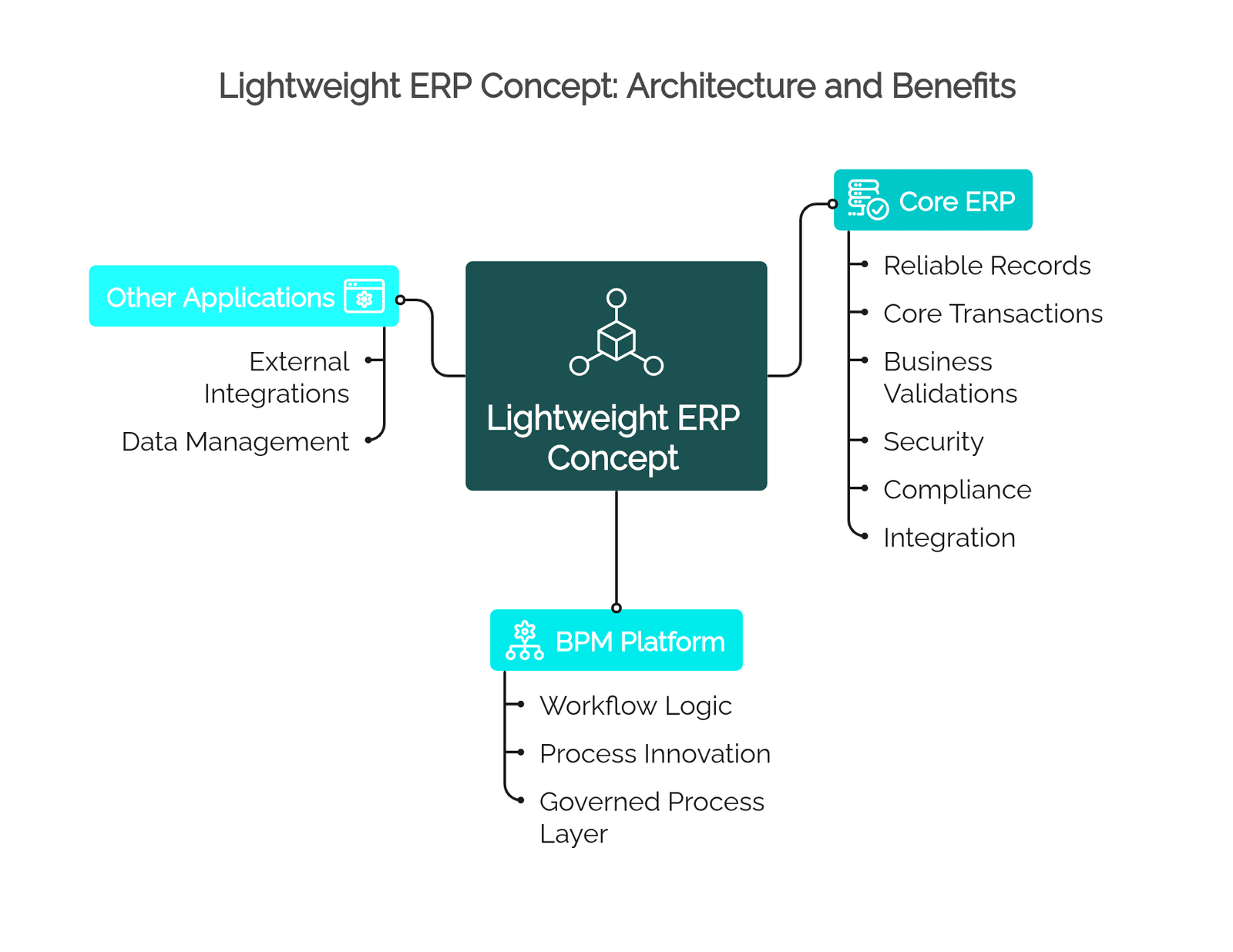
The idea is to keep the ERP focused on what it does best: reliable records, core transactions, business validations, security, compliance, and integration with the company's official data. What you want to avoid is turning it into the place where every operational variation, approval rule, exception path, local workflow, and user-specific requirement gets implemented directly in the core.
Bury too much process logic in the ERP and the core hardens. Small workflow adjustments turn into technical projects. Business teams grow dependent on specialized development. Process knowledge becomes harder to see, document, and improve.
A lightweight ERP architecture separates those responsibilities. The ERP stays stable and trusted; the BPM platform handles the workflow logic that changes more often; other applications run outside the ERP and integrate when needed. The core stays reliable, and process innovation happens in a governed process layer.
Where SAP Fiori Fits
In SAP environments, SAP Fiori adds a valuable piece to this architecture: a familiar, governed, role-based entry point for users.
A BPM platform doesn't have to pull users out of the SAP experience. The workflow can be created and governed in the BPM layer while users access the front end through the SAP Fiori Launchpad. SAP remains the trusted enterprise backbone; Fiori provides the user experience and launchpad governance; the BPM platform manages the process logic behind the work — tasks, approvals, deadlines, routing, exceptions, documentation, visibility.
With HEFLO this combination becomes especially relevant, because process-driven front ends can be generated and exposed through the SAP Fiori Launchpad while staying connected to HEFLO's process execution layer.
There is no ERP-versus-BPM standoff here, and no SAP-versus-HEFLO either. It's a separation of responsibilities: SAP provides the recognized enterprise environment, while HEFLO gives process teams the agility to create and evolve workflow solutions.
ERP vs BPM Platform: A Practical Comparison
The difference between ERP and BPM is less about technology than about responsibility. An ERP controls reliable business records and transactions; a BPM platform controls how work moves across people, rules, deadlines, decisions, and exceptions.
| Decision area | ERP | BPM platform |
|---|---|---|
| Main role | System of record | Process execution layer |
| Best suited for | Transactions, official records, master data, and core controls | Workflow, tasks, approvals, deadlines, routing, and exceptions |
| Process visibility | Usually centered on records, documents, and module status | Centered on process instances, pending tasks, deadlines, and bottlenecks |
| Change model | Often depends on ERP configuration, workflow specialists, or custom development | Can allow controlled changes by process teams within governance rules |
| User operation | Users work in the ERP when handling official records and transactions | Users work in BPM when following process tasks, forms, and workflow logic |
| Integration need | Provides or consumes enterprise data and services | Can operate standalone, lightly integrated, partially integrated, or fully integrated |
| Governance | Strong transactional, technical, and compliance governance | Strong process governance, documentation, versioning, and traceability |
| Risk if overloaded | Too much process variation becomes buried inside the ERP core | It can become another operational layer if roles and ownership are unclear |
| Best architecture | Stable core with clean services | Governed process layer connected to systems of record |
"Which one is better" is rarely the useful framing. What kind of logic are you managing? Stable transactional logic usually belongs close to the ERP. Process logic that changes frequently, crosses departments, needs visibility, or runs on deadlines and exceptions tends to be better served by a BPM platform.
How to Decide Where Process Logic Should Live
Don't start with the tool. Start with the type of logic being managed.
Some logic belongs close to the ERP because it protects the integrity of official business records. Other logic belongs in a BPM layer because it controls how work moves before, around, or after those records are created.
Keep process logic closer to the ERP when it is tightly connected to a core transaction, depends heavily on native ERP rules, changes rarely, and must be fully controlled inside the system of record. Move it to a BPM platform when it crosses departments, changes frequently, involves several approval paths, depends on deadlines and escalations, requires exception handling, or needs to be visible to process owners and managers.
A simple rule of thumb: if your main concern is the integrity of the business record, keep the logic close to the ERP; if it's how work flows across people, rules, deadlines, and exceptions, consider a BPM layer.
That single test helps avoid two familiar mistakes — forcing every workflow variation into the ERP core, and moving process execution outside the ERP without clear governance and an integration strategy.
Final Thoughts
ERP and BPM are not competitors by default. The strongest architectures emerge when each one has a clear responsibility: the ERP keeps the company's official records, transactions, validations, and core controls reliable, while the BPM platform governs how work moves across people, departments, rules, deadlines, approvals, and exceptions.
That separation steers you away from both extremes — an ERP overloaded with every process variation, or workflows running outside the ERP with no control. A BPM layer can support the workflow while the ERP stays the trusted system of record.
In SAP environments, Fiori rounds out the picture by giving users a familiar entry point, with SAP as the enterprise backbone and HEFLO running the process execution layer behind the experience.
So the question worth asking isn't whether to choose ERP or BPM. It's where each type of logic belongs.
FAQ
Does BPM replace ERP?
No. BPM usually complements the ERP. The ERP remains responsible for official business records and core transactions, while BPM helps coordinate the workflow around them.
Why use BPM if the ERP already has workflow capabilities?
ERP workflow can be a good option when the process is closely tied to native ERP rules and changes rarely. BPM becomes more attractive when the workflow changes often, crosses departments, requires business visibility, or needs to be adjusted by process teams without turning every change into a technical project.
Do users have to enter the same information twice?
They should not. In a well-designed architecture, each system has a clear purpose. Integration can reduce duplicate data entry, but even when integration starts light, the goal should be to avoid parallel controls and unnecessary rework.
Can BPM start without full ERP integration?
Yes. Some companies begin with a light implementation to validate the workflow, reduce project cost, and improve visibility quickly. Integration can evolve later as the process becomes more mature and the business case becomes clearer.
When is BPM the main system for a process?
BPM can become the main system when the company does not have an ERP module for that specific process. This is common in internal requests, administrative workflows, document reviews, compliance routines, and service delivery processes.
What is the risk of putting too much process logic inside the ERP?
The ERP core can become harder to maintain. Approval rules, exception paths, local variations, and frequent workflow changes may become hidden in configuration, custom code, or technical backlogs instead of being visible and governable as a process.
What is the risk of using BPM poorly?
BPM can become another disconnected system if ownership, governance, integration, and process standards are not defined. The goal is not just to add a workflow tool, but to create a governed process layer.
Where does SAP Fiori fit in this model?
In SAP environments, SAP Fiori can provide the user entry point. The user may access tasks or process-driven front ends through the SAP Fiori Launchpad, while the process logic is governed in BPM and SAP remains the trusted ERP backbone.
How should a company decide between ERP workflow and BPM?
The decision should consider process frequency of change, integration needs, technical effort, business ownership, visibility requirements, exception handling, and whether the process is mainly about protecting an ERP transaction or coordinating work across people and departments.