SAP Fiori Launchpad Explained in Simple Terms

Many SAP users do not experience SAP Fiori as "a design system." They experience it as the screen where they try to find the apps they need to do their work. That screen is the SAP Fiori Launchpad, and how well it is designed often determines whether users perceive SAP Fiori as modern and focused — or as another confusing layer on top of an already complex system.
This article explains what the Launchpad is, how its main concepts fit together, why two users in the same company see completely different things, and what it takes to design a Launchpad that actually supports how people work.
What Is SAP Fiori Launchpad?
SAP Fiori Launchpad is the central access point for SAP Fiori apps. It gives users a personalized, role-based experience — usually through a browser — where they can open assigned apps, search for available content, and organize parts of their workspace.
It is often the first screen users see when they access SAP Fiori. From there, they can open apps for daily tasks, approvals, reports, master data, operational work, or self-service activities.
The Launchpad is not just a list of apps. It is connected to SAP roles, catalogs, authorizations, navigation targets, spaces, pages, and sometimes legacy transactions exposed through the web. This is why two people in the same company may open the same Launchpad and see entirely different things: the Launchpad is designed around what each person is allowed and expected to do.
Why the Launchpad Matters
The Launchpad shapes how users experience SAP.
A well-designed Launchpad reduces noise, guides users toward the right apps, and supports task-oriented work. A poorly designed one becomes overloaded with tiles, confusing role assignments, missing apps, duplicate entries, slow loading, and unclear navigation.
This is why SAP Fiori adoption is also a question of role ownership and content management, not only of UX. The real question is not "Did we activate SAP Fiori?" but "Did we design a Launchpad experience that reflects how people actually work?"
Tiles, Apps, Links, and Cards
Users access content through visual entry points: tiles, links, and cards.
- A tile is a clickable object that opens an app or target, showing a title, subtitle, icon, number, KPI, or status information.
- A link is a simpler text-based entry point that opens an app or target.
- A card can show richer information — a list, KPI, chart, or business overview — depending on configuration.
A tile is not always the same thing as a native Fiori app. Some tiles open native SAP Fiori apps. Others may open analytical pages, object pages, reports, or even classic SAP GUI transactions exposed through the browser. This distinction matters because users often judge "Fiori" based on what a tile opens, even when the underlying experience is not native.
Spaces, Pages, Groups, and Catalogs
Four concepts define what users see and can access in the Launchpad: spaces, pages, groups, and catalogs. Each one plays a different role.
Spaces and pages
In the current SAP Fiori Launchpad model, spaces and pages structure the user experience.
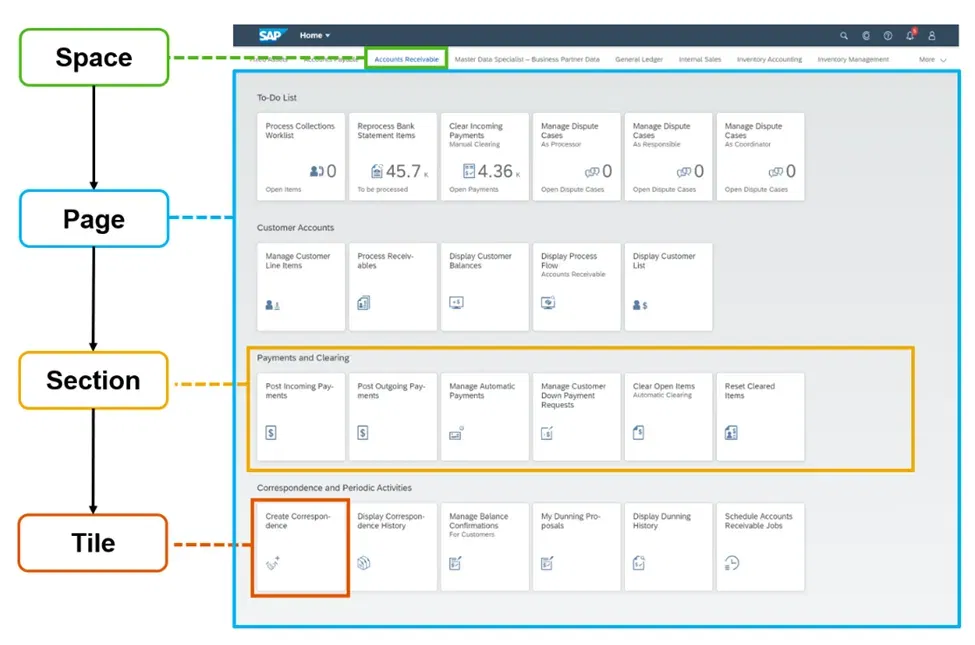
A space represents an area of work, usually corresponding to one or more business roles — for example, procurement, finance operations, sales order management, or manager self-service. A page sits inside a space and contains the apps the user works with, organized into sections so related apps appear together.
| Level | Simple explanation | Example |
|---|---|---|
| Space | A broad work area | Procurement |
| Page | A more specific work context | Purchase Requisitions |
| Section | A group of related apps | Create, Monitor, Approve |
| Tile or link | The entry point to an app | Manage Purchase Requisitions |
Pages are assigned through spaces, and spaces are assigned to business roles. This structure helps avoid one of the classic Launchpad problems: a single home page overloaded with too many tiles.
Groups
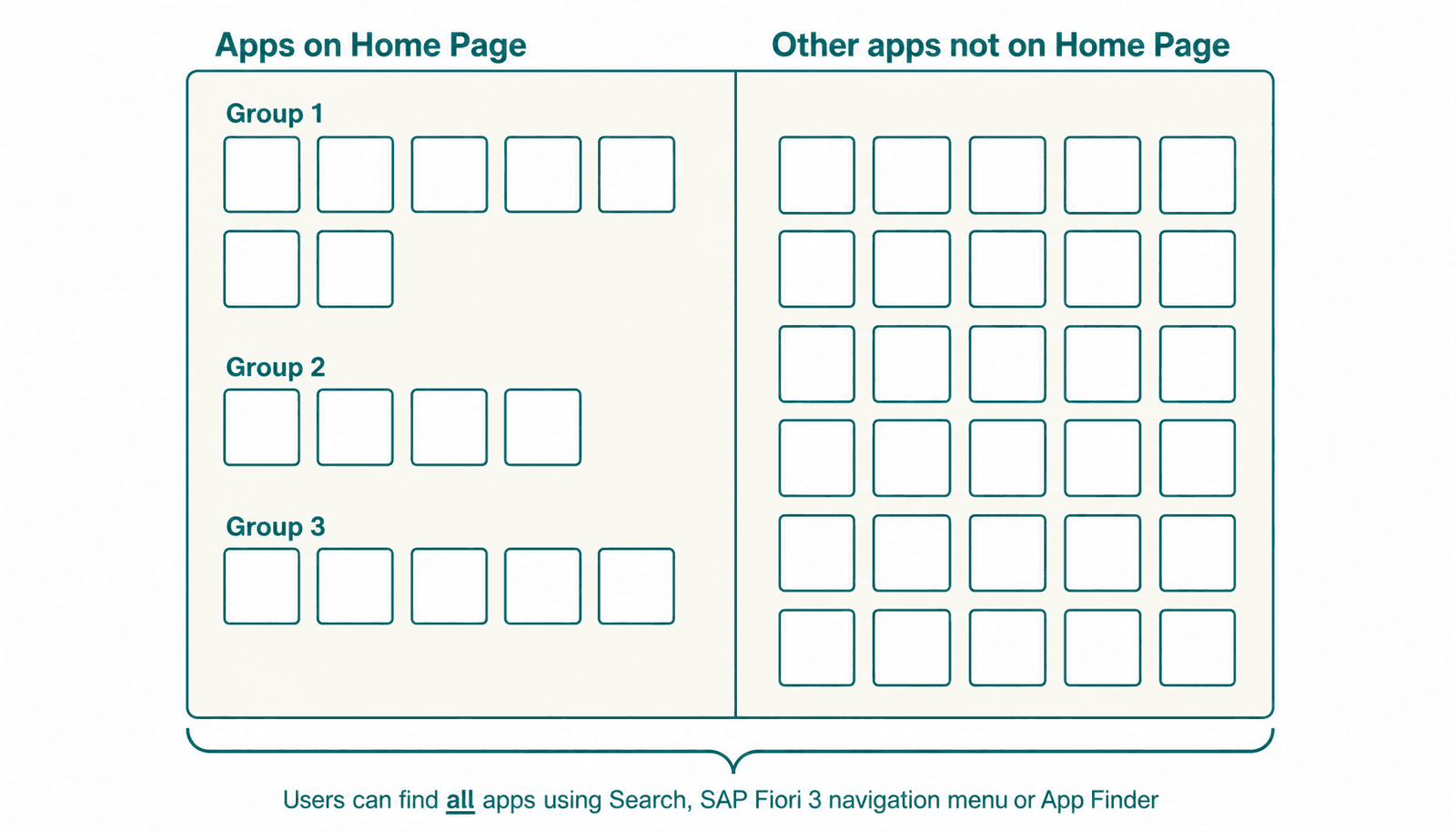
Groups belong to the older Launchpad home page model. Administrators used them to organize tiles under headers on the user's home page, and users could personalize parts of that page. SAP now recommends the spaces and pages model instead. Teams working in existing landscapes should still understand groups, but new design work should be planned around spaces and pages.
Catalogs
A catalog is a collection of apps made available for a role. If a user has a role that includes a certain catalog, that user can access the apps in it — assuming the required authorizations are also in place.
This is where many people get confused:
- A page controls what is shown in the Launchpad layout.
- A catalog controls what apps are available to the user.
An app may be available through a catalog but not placed visibly on a page. The user may still find it through search or app finder, depending on configuration. The distinction is important: if teams only think about "which tiles appear on the page," they may miss the deeper question of which apps the user is actually allowed to access.
How Role-Based Access Works
SAP Fiori Launchpad is role-based. Users do not all see the same thing — what they see depends on the roles assigned to them.
A role can influence:
- Which apps the user can access
- Which catalogs are available
- Which spaces and pages appear
- Which tiles or links are visible
- Which business actions the user can perform
This model has real benefits. It helps users focus on the work they are responsible for, reduces clutter, and improves security by limiting access to apps and functions that are not relevant. It also supports a cleaner experience than giving everyone the same large menu of SAP options.
But role-based access only works when roles are actively maintained. Poorly designed roles cause users to miss important apps. Overly broad roles overload the Launchpad. Overly narrow ones hide useful functionality. And role assignments that are not reviewed regularly become outdated as jobs, teams, and processes change.
Role-based access is powerful, but it needs ownership.
Why Users See Different Apps
A finance analyst, purchasing manager, warehouse worker, and HR employee may all use the same SAP system, but they do not need the same Launchpad. The finance analyst needs apps for invoices and financial reporting. The warehouse worker needs mobile-friendly apps for goods movement. The HR employee needs self-service apps. Each Launchpad reflects the user's role.
This is one of the main ideas behind SAP Fiori — users should see what is relevant to them. But it also explains a common frustration. If users only see what has been assigned to them, they may not know what else exists.
Why can't I find the app my colleague uses?
The answer may be one of several:
- The app is not assigned to their role
- The app is not included in their catalog
- The app is not placed on their page
- The app is not authorized for their user
This is not always a technical defect. Sometimes it is a deliberate role design decision. But when the decision is not documented or explained, users experience it as confusion.
Search and App Discoverability
Search in SAP Fiori Launchpad helps users find apps and, depending on system configuration, business objects or information. Users may search by app name, keyword, or related business term.
But search has limits. If the app is not assigned through the right role or catalog, the user may not find it. If the app name is unclear, users may search using a business term that does not match the app title.
This is why naming matters. A good Launchpad should not rely only on technical app names. Titles, subtitles, spaces, pages, sections, and internal documentation should use language that makes sense to the business. Users may think "approve supplier invoice" while the app uses a more technical SAP-specific name. Closing that gap is one of the most underestimated parts of Launchpad design.
Discoverability complaints are especially common when:
- A user does not know the app name
- A useful app is assigned but not visible on a page
- Different teams use different names for the same business task
- The company has no internal documentation explaining which apps support which process
The solution is not to give everyone every app — that would create security, usability, and performance problems. The solution is clear role definitions, app ownership, access request procedures, and documentation that connects apps to business processes.
Why Too Many Roles and Apps Create Problems
Assigning too many roles to a user creates the opposite problem of restrictive access: information overload. The Launchpad becomes harder to navigate, search results get noisier, and the user may not know which app to use for a specific task.
There can also be a performance impact. More assigned content means more to load, evaluate, personalize, and render. Performance depends on many factors — system configuration, services, content volume, browser behavior, network, backend — but overloaded Launchpads often feel slower and less usable.
Launchpad performance is therefore not only a technical issue. A Launchpad with too much content is often a symptom of weak role design discipline.
The Internal App Catalog
One of the most effective ways to improve SAP Fiori adoption is to create an internal app catalog — a business-facing document or system that explains how apps are used in your environment.
This is different from the SAP Fiori Apps Reference Library. That library is useful for technical reference, but companies still need their own catalog written in the language of their business.
An internal app catalog should explain:
- Which apps are available and who should use them
- Which business process each app supports
- Which role is required to access the app
- What the app is used for — and what it is not used for
- Whether the app replaces a previous SAP GUI transaction
- Whether the app is native Fiori, analytical, custom, or Web GUI-based
- Who owns the app from the business side
- How users can request access or support
This is especially valuable in large organizations, shared services environments, and SAP landscapes with many business roles. It helps users discover what exists without weakening security, and it helps IT, process owners, and key users speak the same language.
Launchpad and Business Processes
A Launchpad can give users access to apps, but it does not define the business process.
A tile may open an approval app. But the approval process includes much more: who can submit the request, what data is required, who approves first, what happens if the approver is absent or the request is rejected, whether there are deadlines, what happens when information is missing, which system stores the final record, and who monitors exceptions.
The Launchpad supports the user experience. It does not replace process understanding. A company can have a clean Launchpad and still have a confusing process behind it.
A practical example: purchase requests
Imagine designing the Launchpad experience for purchase requests. A requester needs an app to create or track a request. A manager needs an approval app. A buyer needs apps for supplier data, purchase order creation, and sourcing. Finance needs visibility into budget and invoice impact. A process owner needs monitoring and exception reports.
If the Launchpad is designed only as a list of apps, each role gets its own tiles but the end-to-end process remains unclear. If it is designed around the process, the team asks better questions: which apps are frequently used, which are only needed for exceptions, which information should be visible before the user opens an app, and which legacy transactions still need to remain available.
This is the difference between technical activation and work environment design.
Practical Governance Checklist
A practical Launchpad management model should answer these questions:
| Question | Why it matters |
|---|---|
| Who owns each business role? | Prevents roles from becoming outdated |
| Who approves app access? | Supports security and compliance |
| Who decides what appears on pages? | Keeps the Launchpad focused |
| Who reviews unused apps? | Reduces clutter and complexity |
| Who maintains app descriptions? | Improves discoverability |
| Who maps apps to business processes? | Helps users understand context |
| Who monitors performance complaints? | Connects adoption with technical design |
| Who trains users on new spaces and pages? | Reduces confusion during rollout |
| Who manages the internal app catalog? | Gives users a reliable source of guidance |
Beyond the checklist, a few practical guidelines tend to make the biggest difference:
- Start from real work, not from the system. Understand how each user group works, which tasks they perform daily, and which exceptions they handle before configuring pages and assigning roles.
- Keep the most important apps visible. Do not fill the first page with rarely used tools.
- Use spaces and pages to reflect business areas, not technical SAP modules.
- Review roles on a fixed cadence. Job responsibilities change, teams reorganize, and new apps become available.
- Train users on the process, not only the tile. People should understand how their app fits into the broader flow of work.
- Be explicit about what is native Fiori and what is not. Users often blame Fiori for experiences that are actually Web GUI or legacy screens.
- Treat power users differently from occasional users. Speed, density, and shortcuts matter to power users in ways that broad visibility cannot capture.
Final Thoughts
The real test of a Launchpad is not whether every app has a tile. It is whether each user can understand where to start, what they are responsible for, and how their work connects to the broader process.
SAP Fiori Launchpad is often described as the entry point for SAP Fiori apps. In practice, it is where SAP roles, user experience, business responsibilities, authorizations, app discovery, and process design meet. The best Launchpad designs come from teams that understand not only SAP configuration, but also how people actually work — across roles, tasks, decisions, exceptions, and business processes.
FAQ
Why do I see different apps than my colleague in SAP Fiori Launchpad?
You may see different apps because SAP Fiori Launchpad is based on roles, catalogs, spaces, pages, and authorizations. Your colleague may have a different business role, a different catalog assignment, or permission to access apps that are not available to your user. In some cases, the app may exist in the system but not be assigned to your role or displayed on your page.
Why can’t I find an app in SAP Fiori Launchpad search?
An app may not appear in search if it is not assigned to your role, not included in one of your catalogs, not configured for search, or not authorized for your user. Search also depends on naming. If the app title uses SAP-specific language and users search with business terms, the app may be harder to find.
What is the difference between a visible tile and an available app?
A visible tile is an entry point shown on your Launchpad page. An available app is an app your user is allowed to access through assigned catalogs and authorizations. In some cases, an app may be available to the user but not shown as a tile on the main page. This is why Launchpad layout and app authorization should be governed together.
Are spaces and pages replacing groups in SAP Fiori Launchpad?
Yes, in modern SAP Fiori Launchpad design, spaces and pages are the recommended way to organize content. Groups belong to the classic Launchpad home page model and may still exist in older landscapes, but new Launchpad governance should usually be planned around spaces and pages.
Can a SAP Fiori Launchpad tile open something that is not a native Fiori app?
Yes. A tile can open a native SAP Fiori app, an analytical app, a report, an object page, a custom application, or even a classic SAP GUI transaction exposed through the browser. This is why users should not assume that every tile represents the same type of experience.
Can too many roles or apps affect SAP Fiori Launchpad performance?
Yes, too many assigned roles, catalogs, pages, or apps can make the Launchpad harder to navigate and may contribute to a slower user experience. Performance also depends on backend services, network conditions, browser behavior, system configuration, and app design, but overloaded role assignments are a common governance issue to review.
How can companies improve app discovery in SAP Fiori Launchpad?
Companies can improve app discovery by using clear app names, well-structured spaces and pages, role-based documentation, access request procedures, and an internal app catalog. The goal is not to give every user every app, but to help users understand which apps exist, what they are used for, and how to request access when needed.
Why should SAP Fiori Launchpad design consider business processes?
Launchpad design should consider business processes because users do not work with apps in isolation. A tile may support one task, but the full process may include approvals, handoffs, deadlines, exceptions, data dependencies, and responsibilities across multiple roles. A better Launchpad helps users understand not only which app to open, but how their work fits into the broader process.