How to Streamline Business Processes: Steps, Examples, and Checklist

“If you can’t describe what you are doing as a process, you don’t know what you’re doing.”
— W. Edwards Deming
Streamlining business processes is one of the most reliable ways to improve efficiency, reduce operating costs, and deliver a better customer experience. Yet most organizations never do it deliberately: work keeps flowing the way it always has, with extra approvals, duplicated data entry, and long waits between departments quietly accumulating over the years.
In this guide, you will learn exactly what it means to streamline business processes, how streamlining differs from optimization and standardization, a 5-step method to apply it, real before-and-after examples, and a 10-point checklist you can use in your next process review.
What Does It Mean to Streamline Business Processes?
To streamline a business process means to simplify and improve the sequence of steps a company follows to complete a piece of work: removing unnecessary tasks, reducing handoffs and wait times, standardizing repetitive activities, and automating rule-based work. The goal is a process that delivers the same (or better) outcome faster, with fewer resources and fewer errors.
The term comes from engineering. A streamlined shape moves through air or water with minimal resistance; a streamlined process moves through the organization with minimal friction. Every extra approval, duplicate form, or status-check email is drag that slows the flow of work.
In practice, streamlining business processes involves five kinds of change:
- Eliminating steps that add no value for the customer or the business.
- Consolidating tasks or approvals that are split across too many people.
- Standardizing the way recurring work is performed, so results are predictable.
- Automating repetitive, rule-based activities such as data entry, notifications, and routing.
- Clarifying ownership, so each step has a clear responsible person and deadline.
Streamlining is not a one-off project. Companies that sustain the benefits treat it as a continuous discipline: they document their processes, measure them, and review them on a regular cycle.
Streamline vs. Optimize vs. Standardize
These three terms are often used interchangeably, but they answer different questions:
- Streamlining removes friction. The question is: “Which steps, handoffs, and delays can we remove or simplify?” The result is a leaner, faster flow.
- Optimization tunes overall performance. The question is: “What is the best possible balance of speed, cost, quality, and risk for this process?” It may involve redesigning the process end to end, changing policies, or rebalancing resources.
- Standardization creates consistency. The question is: “How do we make sure this work is done the same correct way every time, by everyone?” The result is documented procedures, templates, and repeatable outcomes.
They work best in sequence. Standardize first so there is one defined way of working; streamline that standard flow to remove waste; then optimize continuously with data. Trying to optimize a process that is neither standardized nor streamlined usually just automates the existing chaos.
Why Streamline Business Processes? 6 Key Benefits
Companies that invest in process streamlining consistently report gains in six areas:
- Increased productivity: employees spend less time on redundant or manual tasks and more time on work that actually requires judgment.
- Faster turnaround times: fewer approvals, fewer handoffs, and less waiting shorten the path from request to result — often the single most visible improvement.
- Improved quality and consistency: standardized, simplified workflows reduce errors, rework, and variation between teams.
- Lower operating costs: less labor per transaction, fewer corrections, and less administrative overhead translate directly into savings.
- Better customer experience: customers feel streamlined processes as faster responses, fewer mistakes, and fewer requests to “send that document again.”
- Greater agility and easier compliance: lean, documented processes are easier to change when the market shifts — and easier to audit, because controls are explicit instead of buried in someone’s inbox.
How to Identify Processes That Need Streamlining
Before choosing tools or redesigning anything, find out where the friction actually is. These signals almost always indicate a process that needs streamlining:
- The total elapsed time is much longer than the actual working time (days of waiting for minutes of work).
- Several people approve the same request, and nobody remembers why.
- Employees track work in parallel spreadsheets or personal reminders because the official process has no visibility.
- The same data is typed into more than one system.
- Frequent “where is my request?” emails or status-check meetings.
- Errors are found late and cause rework in earlier steps.
The diagram below summarizes the most common operational inefficiencies that signal a need for streamlining:
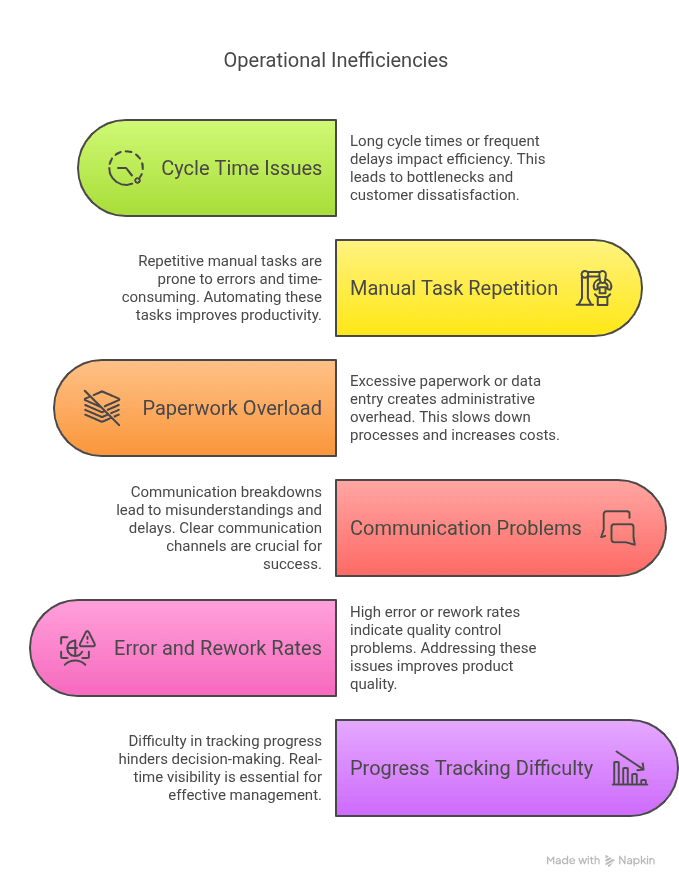
To prioritize, score each candidate process on three factors: frequency (how often it runs), pain (delays, errors, complaints), and feasibility (how easy it is to change). High-frequency, high-pain, cross-departmental processes such as procurement, invoice approval, employee onboarding, and customer support are usually the best starting points, because improvements there are felt immediately across the company.
5 Practical Steps to Streamline Business Processes
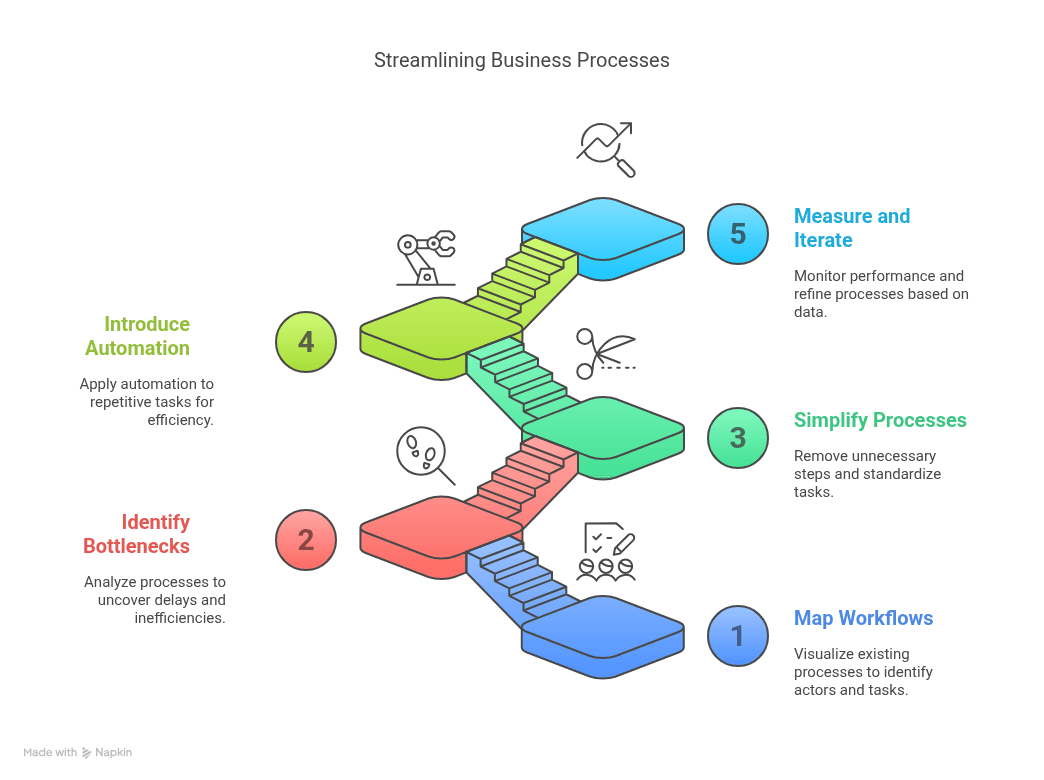
Streamlining does not have to be overwhelming. The five steps below turn it into a repeatable method you can apply to one process at a time.
1. Map the Current Process
Start by making the invisible visible. Interview the people who execute the process and draw the current flow — every task, decision, handoff, and system involved. Use the BPMN notation if you can: it forces precision about who does what and when, and it becomes the baseline for every improvement that follows.
While mapping, record baseline numbers: how long the process takes end to end, how many steps and handoffs it has, and how often work is returned for correction. Without a baseline, you will not be able to prove the streamlining worked.
2. Spot Bottlenecks and Redundancies
Analyze the map to find where work waits, loops back, or duplicates. Typical findings include approval chains with three or more levels, information re-typed between systems, and steps that exist only “because we’ve always done it this way.” Ask the people who run the process daily — they always know where things get stuck, even when management does not.
3. Simplify and Standardize
Remove the steps that add no value, merge the ones that belong together, and reduce approvals to the minimum required for real control. Then standardize what remains: templates for recurring documents, clear work instructions, and one single way of performing each task across teams. Keep the controls that compliance genuinely requires — streamlining is about removing waste, not removing governance.
4. Automate What Adds Value
Only now does automation enter. Automate the repetitive, rule-based parts of the simplified process: request intake through forms, routing and approvals based on business rules, notifications, deadline tracking, and data transfer between systems. Automating a messy process just produces faster mess — which is why this is step 4, not step 1.
5. Measure, Monitor, and Iterate
Define KPIs — cycle time, first-pass yield, cost per transaction, SLA adherence — and compare them against the baseline from step 1. Review the numbers on a regular cycle, gather feedback from process owners, and adjust. Processes degrade over time as exceptions accumulate; a periodic review keeps them lean.
Checklist: How to Streamline Business Processes
Use this checklist in your next process review. By going through each area — mapping, elimination, automation, standardization, visibility, and governance — you will uncover concrete opportunities to streamline the operation.
1. Map the Current Process
- Is there an updated BPMN diagram or flowchart?
- Are tasks, roles, and systems clearly identified?
2. Eliminate Unnecessary Steps
- Are there activities that don't add value to the customer or operation?
- Are there redundant or duplicated approvals?
3. Reduce Handoffs and Wait Times
- Are there excessive handoffs between departments?
- Are there delays due to approvals, documents, or systems?
4. Automate What You Can
- Are there manual tasks that could be automated (emails, data entry, notifications)?
- Do you need a ticket or task management system?
- Does your ERP system support partial automation of the process?
- Does the process use any workflow or RPA tools?
5. Standardize Repetitive Tasks
- Are there templates, scripts, or models for frequent actions?
- Are work instructions documented and accessible?
6. Improve Visibility and Control
- Are there KPIs and metrics associated with the process?
- Can you track bottlenecks, average times, and failure points?
7. Gather Feedback from Process Owners
- Did the team involved in the process contribute to the review?
- Is there a channel for continuous improvement suggestions?
8. Preserve Controls and Compliance
- Are legal or regulatory requirements still being met?
- Is the process still aligned with internal policies?
9. Communicate and Train the Team
- Has the new version been shared with all stakeholders?
- Were users trained on the streamlined process?
10. Monitor and Continuously Improve
- Is there a regular review cycle for the process?
- Are metrics tracked after the changes?
Prefer the MS Excel version? click here to download it.
❌ No email. No forms. Just the file.
Streamlined Process Examples: Before and After
What does streamlining look like in practice? Here are three common processes and how they typically change.
Example 1: Invoice Approval
Before: invoices arrive by email, are printed for signature, and pass through up to five approvers regardless of amount. Average cycle time: 12 days, with frequent late-payment penalties.
After: invoices enter through a single digital intake, business rules route low-value invoices to a single approver and reserve multi-level approval for exceptions, and reminders fire automatically before due dates. Cycle time drops to 2–3 days and late payments nearly disappear.
Example 2: Employee Onboarding
Before: HR keeps a spreadsheet of tasks and emails IT, facilities, and the hiring manager separately. New hires regularly arrive without system access or equipment.
After: one onboarding workflow triggers all department tasks in parallel with deadlines and automatic escalation. Every new hire is productive on day one, and HR can see the status of each onboarding in real time.
Example 3: Customer Support Escalation
Before: complex cases are escalated by forwarding email threads; context gets lost and customers repeat their story to every new agent.
After: escalations follow a defined flow with structured case data, automatic assignment by category, and SLA timers at each stage. Resolution time falls and customer satisfaction scores rise.
Notice the pattern: none of these transformations started with technology. Each one first removed steps and clarified rules — then used automation to enforce the leaner flow.
A Proven Method: ESOAR
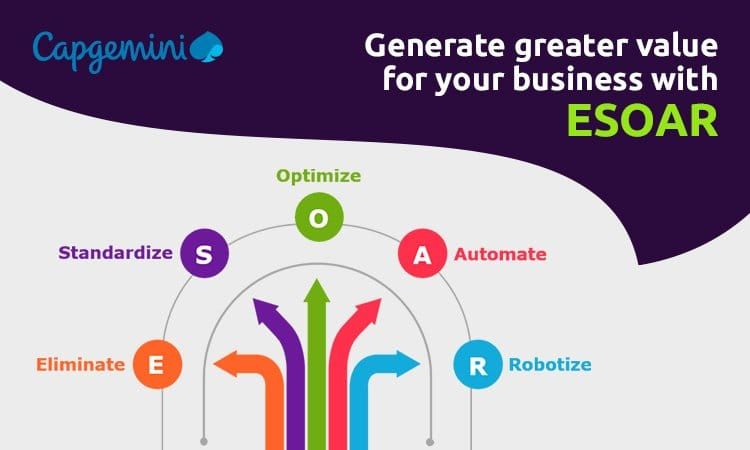
If you want a formal framework, Capgemini’s ESOAR methodology applies the same logic at enterprise scale: Eliminate, Standardize, Optimize, Automate, Robotize — in that order, so automation amplifies a clean process instead of accelerating a broken one.
In one published case, a major manufacturer applied ESOAR to its finance and accounting operations: non-value-added tasks were eliminated, finance processes were unified across countries, and RPA was deployed only at the end — for balance reviews, invoice data transfers, and report generation. The results included a 25% improvement in on-time payments, 30% more efficient invoice processing, 50% faster payment processing, and a 15-point rise in user satisfaction.
Tools to Streamline Business Processes
The right tooling depends on which part of the work you are streamlining:
- Process modeling tools to document and analyze flows in BPMN before changing them.
- Workflow automation / BPMS platforms to execute the redesigned process with forms, routing rules, deadlines, and dashboards.
- RPA (robotic process automation) for repetitive interactions with legacy systems that have no integration options.
- Integration platforms to move data between systems and eliminate duplicate entry.
- Analytics and process mining to find bottlenecks in high-volume processes using real event data.
Platforms like HEFLO BPM combine the first two categories in a single environment — which matters, because the map you draw in step 1 becomes the executable process of step 4 without translation loss. You can expect:
- Drag-and-drop process modeling in the BPMN 2.0 standard for clear, structured documentation
- No-code automation with customizable forms and task routing to reduce manual effort
- Built-in collaboration to align teams and stakeholders at every stage
- Real-time dashboards and audit trails for performance monitoring and compliance
- Cloud-based access with secure infrastructure and easy deployment
👉 Want to see how this works in practice? Explore HEFLO’s automation features.
Frequently Asked Questions
What does it mean to streamline a business process?
It means simplifying the way work gets done: removing unnecessary steps, reducing handoffs and wait times, standardizing repetitive tasks, and automating rule-based work so the process runs faster, at lower cost, and with fewer errors.
What is the difference between streamlining and optimizing a process?
Streamlining focuses on removing friction: fewer steps, fewer handoffs, less waiting. Optimization is broader; it tunes the entire process for the best possible performance, balancing cost, quality, speed, and risk, and often involves redesigning the process end to end.
How do you streamline a business process?
Map the current process, measure its baseline performance, identify bottlenecks and non-value-added steps, eliminate or simplify them, standardize what remains, automate repetitive tasks, and monitor KPIs to keep improving.
What is an example of streamlining a business process?
A classic example is invoice approval: replacing email-based approvals that involve five people with automated routing based on amount thresholds, so most invoices are approved in a single step and only exceptions require human review. Cycle time typically drops from weeks to days.
What are the main benefits of streamlining business processes?
Higher productivity, faster turnaround, more consistent quality, lower operating costs, a better customer experience, easier compliance, and more capacity for the team to focus on high-value work.
Which processes should you streamline first?
Start with processes that run frequently, cross several departments, and generate visible pain. Invoice approval, purchasing, employee onboarding, and customer support are common first candidates because improvements pay off quickly.
How do you measure whether a process is streamlined?
Track process KPIs before and after the change: cycle time, number of steps and handoffs, first-pass yield (work completed without rework), cost per transaction, and SLA adherence. If those improve while quality holds, the streamlining worked.
Final Thoughts
Streamlining business processes is not about working harder or buying more software. It is a sequence: understand the current flow, remove the friction, standardize what works, automate what repeats, and measure the result. Companies that follow that sequence — one process at a time — compound the gains into a real competitive advantage.
👉 Ready for the next step? Learn how a BPMS supports the whole cycle, from modeling to automation and monitoring: What is BPMS?