Text Annotation
An open-bracket note that adds free-text explanation to the diagram without affecting execution.
The Text Annotation is the modeler's margin note: business rules the notation can't express, SLAs, references to policies, clarifications for readers. Connected by a dotted association to its subject, it renders as an open square bracket with text.
Used judiciously it is documentation gold; overused it buries the diagram.
When to use and avoid
When to use
To record a rule or premise the notation alone can't convey.
To document SLAs, exceptions or references beside an activity.
To guide readers unfamiliar with the process.
When NOT to use
As a substitute for correct modeling — if it affects flow, model it with real elements.
In volume — too many notes destroy readability.
For data traveling the process — that is a Data Object.
Business example
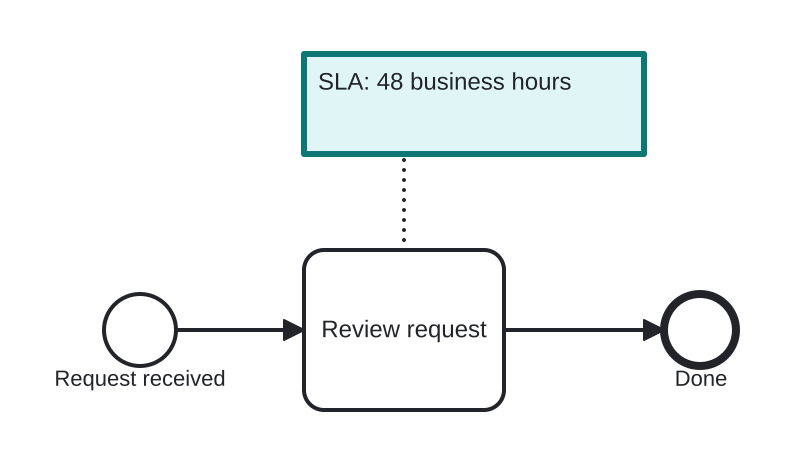
Annotating an SLA rule
Open this example in the HEFLO process editor and explore the diagram from the inside.
Open in the HEFLO editor →Step by step
- Review request carries the Text Annotation (highlighted): “SLA: 48 business hours”.
- The dotted association ties the note to its task.
- The executable semantics are untouched — the note informs humans, not engines.
Differences
Text Annotation vs modeled behavior
If the note describes something that *should happen* (a deadline, an escalation), consider modeling it (timer boundary, escalation event) instead — annotations document, they don't execute.
FAQ
Does a text annotation change execution?
Never — it is ignored by engines. Its audience is the human reader.
How is it linked to an element?
With a dotted Association to whatever it comments — task, event, gateway or flow.