From Requirements to BPMN: How Business Analysts Can Model Better Processes
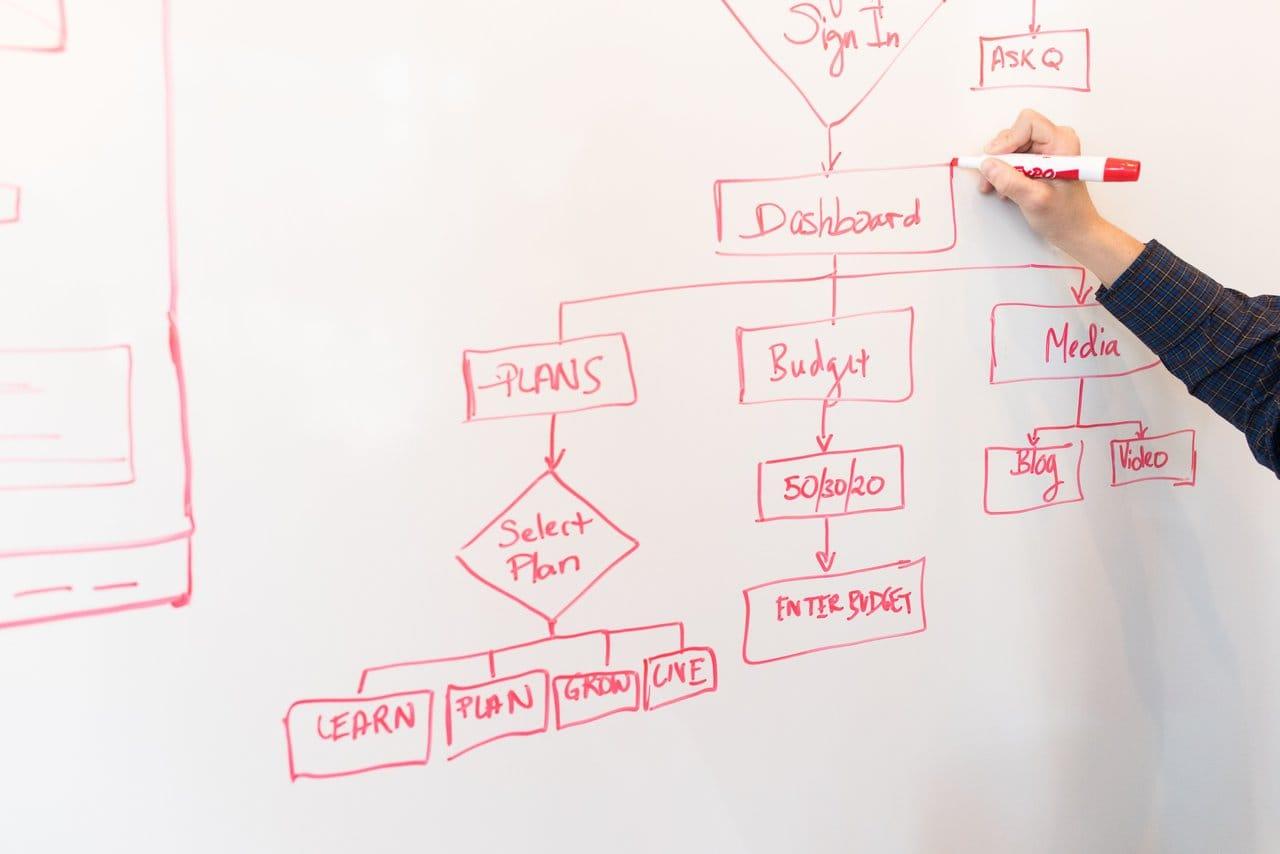
Most requirements documents describe what a business needs. Very few describe how work actually flows to deliver it. That gap is where projects stall: developers build features that don't match operational reality, stakeholders approve documents they never fully understood, and automation initiatives inherit ambiguity that should have been resolved months earlier.
BPMN (Business Process Model and Notation) closes that gap. For business analysts, it works as a bridge between the language of requirements — needs, rules, constraints — and the language of execution: who does what, when, in what order, and what happens when things go wrong.
This guide walks through how to move from a set of requirements to a validated BPMN model, with a step-by-step framework and a worked example at the end.
Why requirements need process context
A requirement like "the system must allow managers to approve purchase orders above $5,000" looks complete on paper. In practice, it raises questions the document never answers. Who submits the order? What happens below $5,000? What if the manager is on vacation? How long can an approval sit before someone escalates it?
Requirements stripped of process context force everyone downstream — developers, testers, vendors, operations teams — to invent answers. Each invented answer is a small deviation from what the business actually needed, and those deviations compound.
Process context anchors each requirement to a specific point in a flow of work. When a requirement lives inside a process model, its trigger, its actors, its preconditions, and its downstream effects become visible. Ambiguity that survives a requirements review rarely survives a process walkthrough, because a diagram makes gaps physically visible: a sequence flow that goes nowhere, a decision with only one outcome, a task with no assigned role.
The BABOK Guide recognizes this by listing process modeling among its core techniques. Requirements analysis and process modeling aren't competing disciplines — the second is how the first gets verified against operational reality.
What BPMN adds to business analysis
Business analysts already use flowcharts, swimlane diagrams, and narrative descriptions. BPMN adds three things those informal notations lack.
A shared, standardized vocabulary. BPMN is an ISO standard (ISO/IEC 19510). An exclusive gateway means the same thing in São Paulo, Amsterdam, and Chicago. When a consultant hands a model to a client's IT team, nobody needs a legend explaining what the shapes mean.
Executable semantics. Unlike a Visio flowchart, a well-formed BPMN model can be interpreted by a process engine. The same diagram the business approved can drive task assignment, deadlines, and system integrations. This is the single biggest advantage for analysts working on digital transformation: the model isn't documentation about the solution — it can become part of the solution.
Precision about the hard parts. Informal diagrams handle the happy path well and everything else poorly. BPMN has dedicated constructs for the situations that actually cause operational pain: timeouts (timer events), interruptions (boundary events), parallel work (parallel gateways), external dependencies (message events), and compensation when something must be undone.
How to identify process triggers
Every BPMN process starts with a start event, and choosing the right one is a genuine analysis decision, not a formality. Ask stakeholders: what makes this work begin?
The answers usually fall into a few categories, each mapping to a BPMN start event type:
- A request arrives — a customer submits a form, an email lands, an ERP sends a purchase requisition. Model it as a message start event.
- A date or schedule — month-end closing, quarterly review, contract renewal window. Model it as a timer start event.
- A condition becomes true — inventory drops below a threshold, a credit limit is exceeded. Model it as a conditional start event.
- Someone simply decides to start — an employee opens a request on their own initiative. A plain none start event is enough.
A useful interview question is "how did the last five instances of this process actually start?" Stakeholders often describe the official trigger first and the real ones later. If a process can start three different ways, model three start events (or three processes) rather than pretending there's one entry point — hidden triggers are a classic source of orphaned work items after go-live.
How to identify activities, roles and handoffs
Requirements tend to be written in passive voice: "the invoice shall be validated." BPMN forces you to answer by whom. That forcing function is one of the most valuable things the notation does for an analyst.
Work through the requirements and extract every verb that consumes time or produces an outcome. Each becomes a candidate task. Then classify it:
- A user task if a person performs it through a system (approve a request, review a document).
- A service task if a system performs it without human involvement (call an API, generate a PDF, post to the ERP).
- A manual task if it happens entirely outside any system (physically inspect a shipment).
Next, assign each task to a lane representing a role — not a named individual, and usually not a department. "Financial Analyst" ages better than "Maria" and is more precise than "Finance."
Handoffs deserve special attention because they're where processes lose time. Every sequence flow that crosses a lane boundary is a handoff, and each one should prompt questions: How does the next role find out work is waiting for them? What information travels with the handoff? What happens if they don't act? In many real processes, the tasks themselves take minutes while the handoffs between them take days. Making handoffs visually explicit in the model is often the first time stakeholders see where their lead time actually goes.
When another organization or an external system is involved — a supplier, a payment provider, a customer — model it as a separate pool and connect it with message flows. This keeps the boundary of your control explicit, which matters enormously when the process later moves toward automation.
If tasks, lanes, and pools are new territory for you, HEFLO offers a free BPMN lesson that walks through these building blocks while you create your first diagram step by step — a 20-minute detour that makes the rest of this guide considerably easier to apply.
How to identify gateways and business rules
Business rules hide inside requirements as conditional language. Train yourself to spot the keywords: if, when, unless, depending on, above, below, only, except. Each one signals a decision point that becomes a gateway in BPMN.
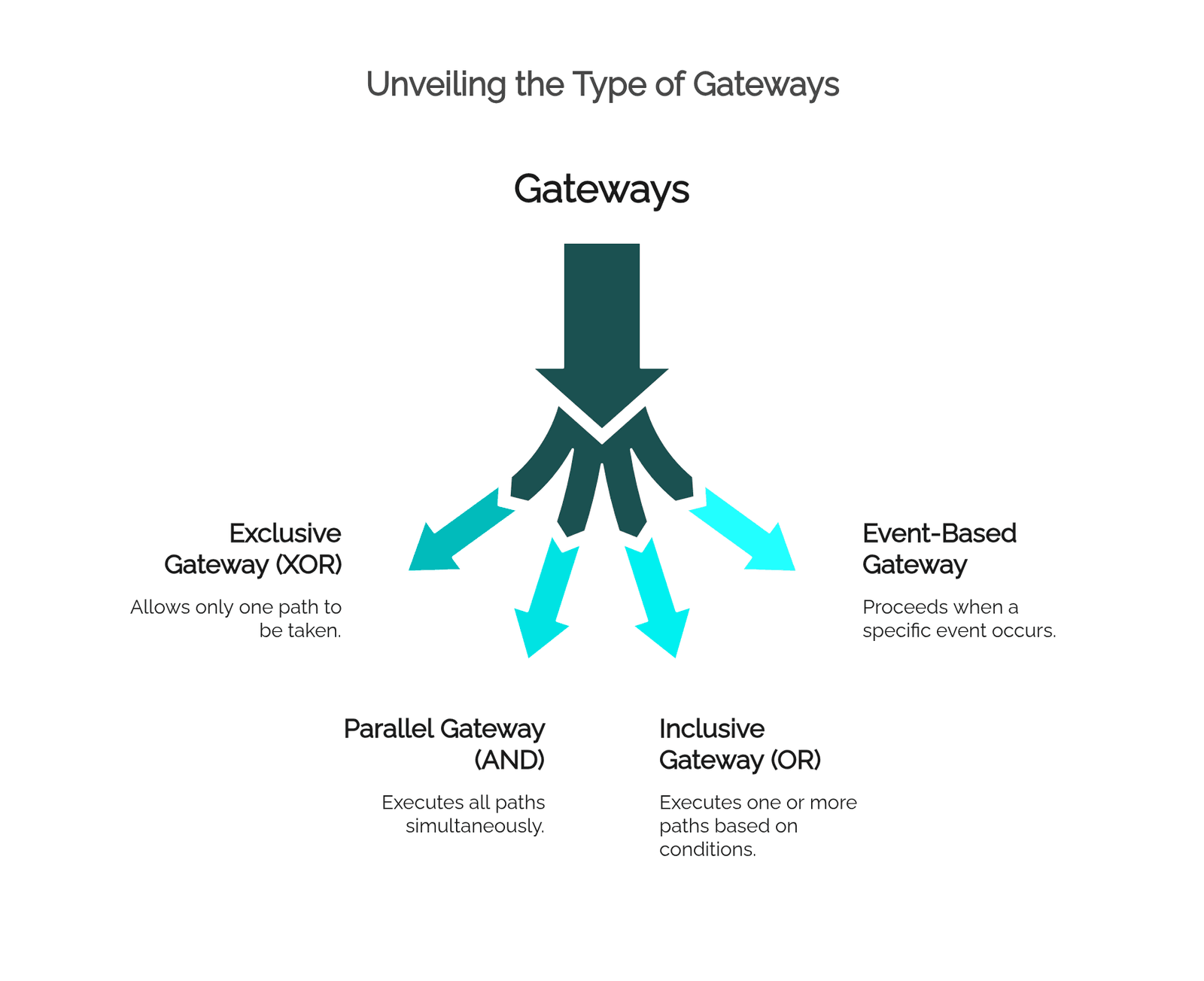
Match the rule to the right gateway type:
- Exclusive gateway (XOR) — one path out of several. "If the amount exceeds $5,000, route to a director; otherwise, to a manager."
- Parallel gateway (AND) — everything happens at once. "Legal and Finance review the contract simultaneously."
- Inclusive gateway (OR) — one or more paths, depending on conditions. "Notify every department affected by the change."
- Event-based gateway — the process waits to see what happens first. "Proceed when the customer replies, or cancel if 10 days pass."
Two practices separate professional models from amateur ones here. First, label every outgoing flow from an exclusive gateway with its condition ("> $5,000", "≤ $5,000"), and make sure the conditions are mutually exclusive and collectively exhaustive — a gateway whose conditions can both be false is a process that silently dies. Second, keep the rule logic out of the diagram when it's complex. A decision with twelve input variables belongs in a decision table (DMN pairs naturally with BPMN for this), referenced by a single business rule task. The diagram shows that a decision happens and what paths result; the table holds the details.
How to model exceptions and escalations
Ask any operations manager and they'll tell you: the happy path is maybe 70% of instances, and the other 30% consumes 70% of the effort. Requirements documents systematically underspecify this territory, which makes it exactly where a business analyst adds the most value.
BPMN gives you precise tools for it:
- Timer boundary events on a task model deadlines. Attach one to "Approve request" with a 48-hour duration, and route the timeout path to a reminder or a substitute approver. An interrupting timer cancels the original task; a non-interrupting one lets it continue while the escalation fires in parallel.
- Error boundary events capture failures — a payment declined, an integration returning an error — and route to a recovery path instead of leaving the instance stuck.
- Escalation events model the organizational response when normal handling isn't enough: raise the issue to a supervisor without necessarily aborting the work in progress.
- Message boundary events handle external interruptions, such as a customer canceling an order mid-fulfillment.
Here is a timer boundary event doing real work in an accounts payable process:
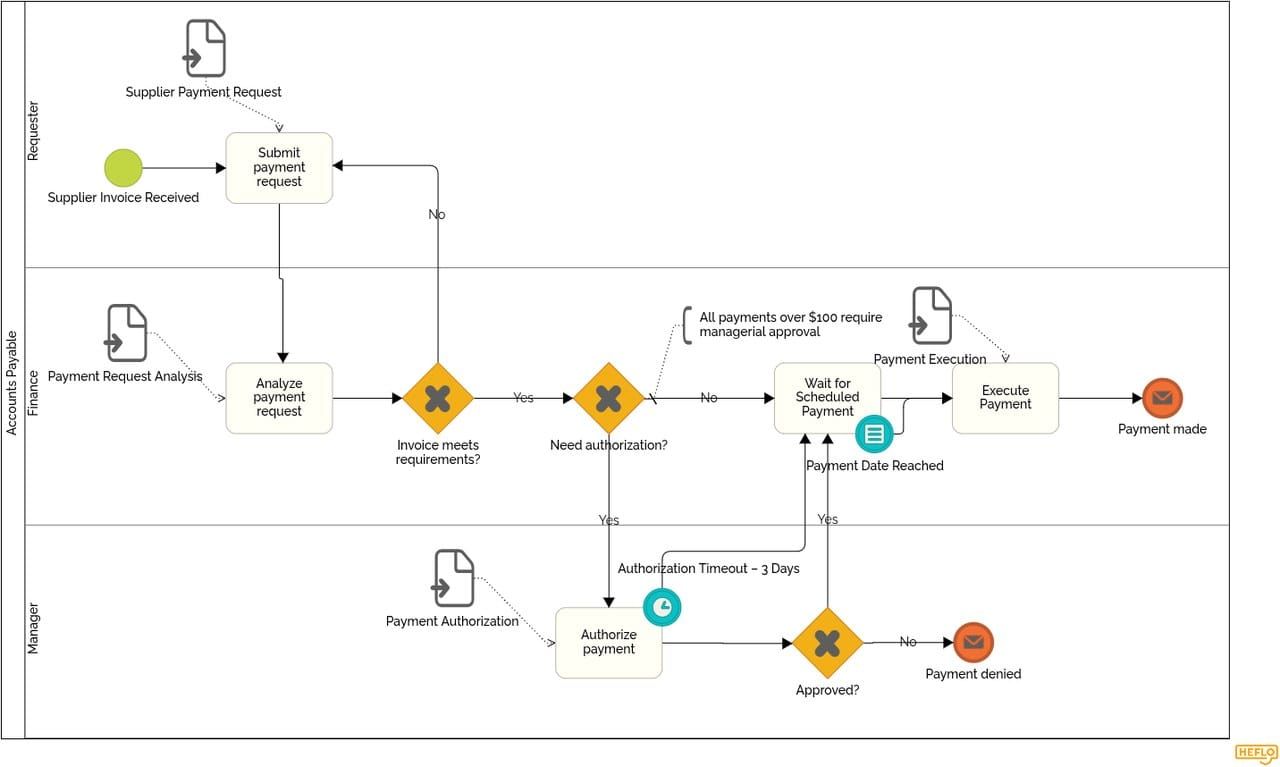
A practical elicitation technique: for every task in the draft model, ask the stakeholder "what's the worst thing that has actually happened here in the last year?" The answers populate your exception paths with real scenarios rather than hypothetical ones. Resist the urge to model every conceivable failure, though — model the exceptions that occur often enough to need a defined response, and leave true black swans to human judgment.
How to validate BPMN models with stakeholders
A model nobody has challenged is a hypothesis, not a specification. Validation is where the analyst converts a plausible diagram into an agreed one, and the technique matters.
Walk through instances, not shapes. Instead of explaining notation ("this diamond is an exclusive gateway"), pick a concrete case: "A request for $8,200 comes in from the logistics team on a Friday afternoon. Show me what happens." Follow the token through the model together. Stakeholders who would never critique abstract notation will immediately object when the concrete scenario takes a wrong turn.
Validate per lane. Each role only needs to confirm its own lane and its handoffs. Don't ask a warehouse supervisor to validate the finance lane — ask them whether the work arriving in their lane matches reality, and whether what they pass on is complete.
Probe the gateways hardest. Decisions are where models diverge from reality. For every gateway, ask "who decides this, based on what information, and is that information actually available at this point in the process?" A surprising number of modeled decisions turn out to depend on data nobody has yet.
Publish, don't just present. A model shown once in a workshop is forgotten in a week. Publishing models where the organization can browse them — with descriptions, attached documents, and version history — turns validation from an event into a continuous practice. This is where a platform beats a diagram file: in HEFLO, models are published to a shared portal where stakeholders comment on the actual diagram, and every change is versioned, so "which version did we approve?" always has an answer.
How BPMN prepares a process for automation
The distance between a modeled process and an automated one is much shorter than the distance between a requirements document and an automated process. If the model was built with discipline, most of the automation design is already done:
- Lanes become role-based task assignment. The process engine routes each user task to the queue of the right role.
- Gateway conditions become executable expressions. "> $5,000" stops being a label and starts being evaluated against real data at runtime.
- Service tasks become integration points. Each one maps to an API call, a database operation, or a message to another system.
- Timer events become SLAs. The 48-hour boundary timer you modeled during analysis becomes an enforced deadline with automatic escalation.
- The data implied by forms and decisions becomes the process data model. Every field a gateway condition references must be captured somewhere upstream — the model tells you exactly where.
Before handing a model to automation, run a readiness pass: Does every user task specify what data the person sees and enters? Does every gateway condition reference data that exists by that point? Does every exception path end somewhere deliberate? Is every external dependency modeled as a message flow rather than buried in a task description?
This is also where working in an execution-capable platform pays off. In HEFLO, the same BPMN model used for documentation is the one that gets automated — you add forms to user tasks, bind conditions to gateway flows, connect service tasks to external systems, and deploy. There is no translation step where a developer reinterprets the diagram, which means there is no translation step where meaning gets lost.
A step-by-step framework: from business need to automated process
The sections above cover the techniques. Here is the sequence that ties them together.
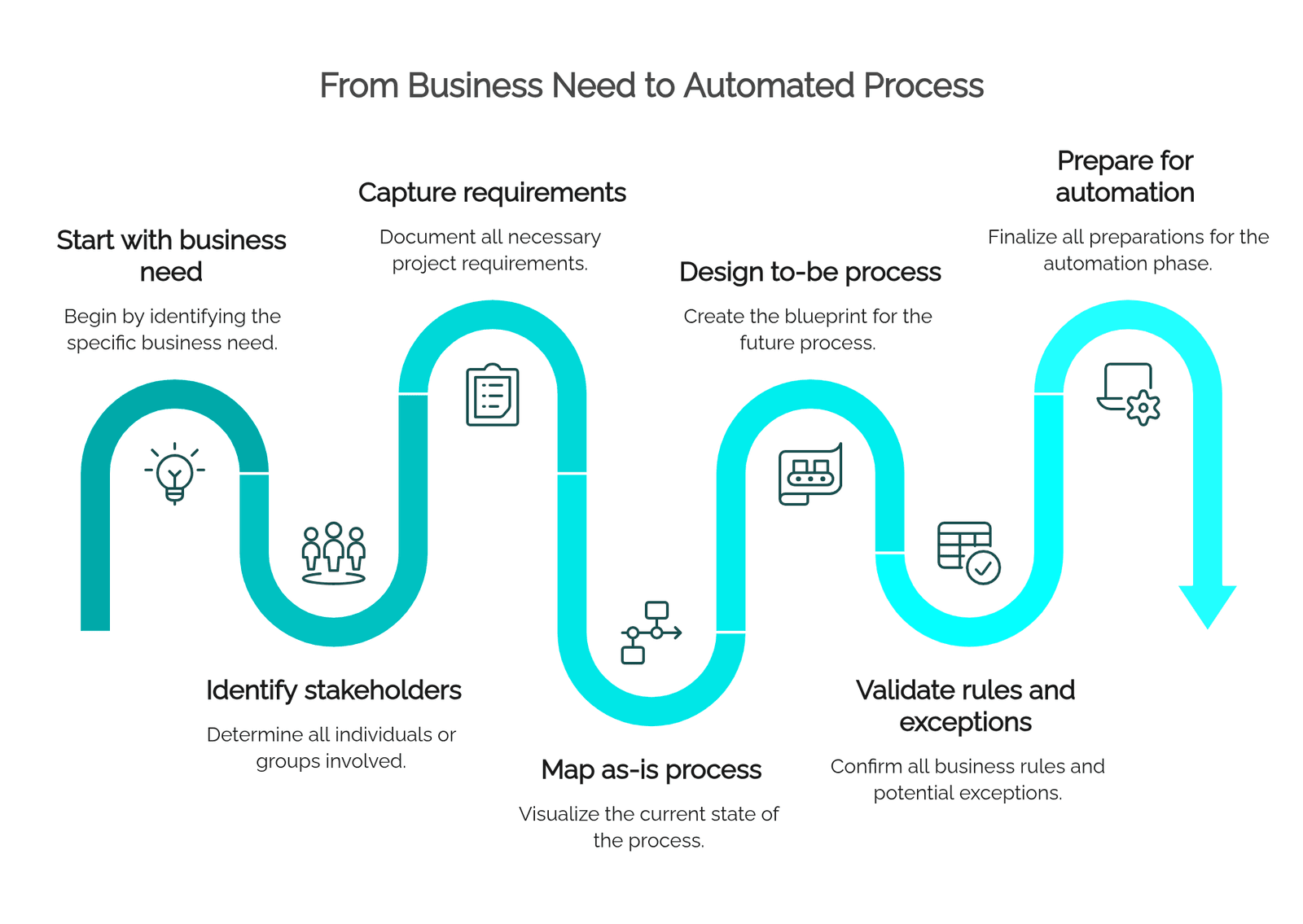
1. Start with the business need. Before modeling anything, write down the problem in business terms: cycle time too long, error rate too high, no visibility, compliance risk. This becomes the yardstick for every later decision. A to-be model that doesn't measurably address the original need is decoration.
2. Identify stakeholders. List every role that starts, performs, decides, receives, or audits the process — including the external parties. These are your interview subjects, your future lanes, and the people who must eventually approve the model. Missing a stakeholder here means discovering a missing lane during validation, or worse, after go-live.
3. Capture requirements. Elicit functional requirements, business rules, data needs, and constraints using whatever techniques fit — interviews, document analysis, observation. Tag each requirement with the conditional keywords and passive-voice verbs discussed earlier; they're the raw material for gateways and tasks.
4. Map the as-is process. Model how work happens today, including the workarounds and the informal escalations people are reluctant to admit to. The as-is model serves two purposes: it validates that you understood the operation, and it exposes exactly where the pain points from step 1 live in the flow.
5. Design the to-be process. Now redesign with the business need as the objective: remove handoffs that add no value, parallelize what can run concurrently, push decisions to explicit rules, and place automation where it removes drudgery. Keep the to-be model honest — every change should trace back to a requirement or a measured pain point.
6. Validate rules and exceptions. Walk stakeholders through concrete instances, lane by lane, gateway by gateway. Stress-test the exception paths with real incidents from the past year. Iterate until the process owners sign off on a specific model version.
7. Prepare for automation. Run the readiness pass: task data, gateway expressions, integration points, SLAs, exception endings. Then move the model into execution — configure forms, bind rules, connect systems — and pilot with a limited scope before rolling out.
The framework is iterative in practice. Validation in step 6 routinely sends you back to step 3, and that's a feature: it's far cheaper to revise a diagram than to rework an automated process in production.
Practical example: turning requirements into a BPMN process
Consider a realistic requirements fragment for a purchase request process:
Employees must be able to request purchases. Requests above $5,000 require director approval; others require manager approval. Approved requests are sent to procurement, which obtains at least two supplier quotes. If no approval decision is made within 48 hours, the request must be escalated. Rejected requests are returned to the employee with a justification.
Here is how the analysis unfolds.
Trigger. "Employees must be able to request purchases" — an employee decides to start. A none start event, "Purchase request submitted," in the Employee lane.
Tasks and lanes. The verbs give us the tasks: submit request (user task, Employee lane), approve request (user task — but in which lane?), obtain supplier quotes (user task, Procurement lane), return with justification (this one turns out to be a notification, better modeled as the rejection path ending with a message to the employee).
Gateway. "Above $5,000 → director; others → manager" is conditional language: an exclusive gateway right after submission, with two labeled flows — "> $5,000" routing to "Approve request" in the Director lane, "≤ $5,000" routing to the same task in the Manager lane. During validation, someone will inevitably ask what happens at exactly $5,000; the labels above already answer it, which is precisely why you write them.
Second gateway. The approval outcome itself: an exclusive gateway after the approval task with "Approved" and "Rejected" flows. Approved routes to Procurement; Rejected routes to an end event that notifies the employee with the justification captured in the approval form.
Exception. "If no decision within 48 hours, escalate" becomes a non-interrupting timer boundary event on the approval task, set to 48 hours, routing to an escalation task — say, notifying the approver's superior — while the original approval remains open.
Hidden requirement surfaced. "At least two supplier quotes" implies a rule Procurement must satisfy before proceeding. Modeling it raises the question the document never answered: what happens if only one supplier responds? That question goes back to stakeholders in step 6 — and finding it during modeling instead of during operation is the entire point of this discipline.
The result is a two-lane-plus model (Employee, Manager, Director, Procurement) with two exclusive gateways, one timer boundary event, and every requirement from the original paragraph traceable to a specific element. Built in a platform like HEFLO, that same model can then be published for validation, documented with attached policies, and configured for execution — the approval form, the 48-hour SLA, and the routing rules all live directly on the elements you already modeled.
From model to living process
The journey from requirements to BPMN is really a journey from ambiguity to commitment. A requirements document lets everyone keep their private interpretation; a validated process model forces those interpretations into the open and reconciles them while changes are still cheap.
For business analysts, BPMN fluency compounds: the same skills that make your documentation clearer make your automation projects faster, your stakeholder workshops sharper, and your requirements harder to misread. And when your modeling tool is also your execution platform, the model you fought to get right stops being a deliverable and becomes the process itself.
HEFLO gives business analysts that full path in one place — model in standard BPMN, document each element, publish for stakeholder validation, and automate without redrawing anything. Try modeling your next process in HEFLO and see how far a well-built model can carry a project.
Frequently Asked Questions
What is the difference between requirements and a BPMN process model?
Requirements describe what the business needs — capabilities, rules, and constraints — while a BPMN model shows how work flows to satisfy those needs: the sequence of tasks, the roles performing them, the decisions, and the exceptions. Requirements answer "what must be true"; the BPMN model answers "who does what, when, and in what order." They complement each other: the model verifies requirements against operational reality.
Do business analysts need to know full BPMN to model processes?
No. A working subset — tasks, exclusive and parallel gateways, start/end events, timer and error boundary events, pools, and lanes — covers the vast majority of real business processes. The BABOK Guide includes process modeling as a core business analysis technique, and analysts can add advanced constructs like compensation or event subprocesses as specific needs arise.
How do I identify gateways from a requirements document?
Look for conditional language: words like if, when, unless, above, below, only, and except signal decision points. Each becomes a gateway — exclusive when only one path applies, parallel when work happens simultaneously, inclusive when one or more paths may apply. Label every outgoing condition and check that conditions are mutually exclusive and cover every case.
How do I model deadlines and escalations in BPMN?
Use timer boundary events attached to tasks. An interrupting timer cancels the task and redirects the flow (for example, to a substitute approver), while a non-interrupting timer lets the task continue while an escalation path — such as notifying a supervisor — runs in parallel. This turns SLA requirements into explicit, and later executable, model elements.
Should I model the as-is process or go straight to the to-be design?
Model the as-is first in most cases. It validates your understanding of the operation, exposes where the pain points actually live, and gives stakeholders a familiar baseline to critique. Skipping it is only advisable for genuinely new processes with no current-state equivalent.
How does BPMN help with process automation?
A disciplined BPMN model already contains most automation design decisions: lanes define task assignment, gateway conditions become executable expressions, service tasks mark integration points, and timer events define SLAs. On an execution platform like HEFLO, the same model used for analysis and documentation is configured directly for execution, eliminating the translation step where requirements traditionally get lost.
How do I validate a BPMN model with non-technical stakeholders?
Walk through concrete instances rather than explaining notation: pick a realistic case and follow it through the diagram together. Validate lane by lane so each role reviews only its own work and handoffs, and probe every gateway by asking who decides, based on what data, and whether that data exists at that point. Publishing the model on a shared portal keeps validation continuous instead of a one-off workshop.