Common BPMN Mistakes: What Modelers Get Wrong (Survey Data)
The most common BPMN mistakes are incorrect gateway usage, overcomplicated diagrams and mixing levels of detail in one model. Among respondents to the HEFLO Process Modeling Assessment, incorrect gateway usage was the mistake they see most often. Most of these errors are semantic, not visual, which is why a BPMN diagram that looks clean can still be wrong.
Many organizations draw process diagrams and still struggle to make them clear, consistent and usable in daily operations. The notation is rarely the cause. BPMN 2.0 is a precise standard, but it does not stop anyone from drawing a diagram that looks tidy and describes the wrong behavior.
The data in this article comes from the HEFLO Process Modeling Assessment, a free and anonymous self-assessment published on the HEFLO website. Participants answer 20 questions about how they model processes, in six areas: diagram complexity and structure, correct use of BPMN techniques, best practices, business readability, common modeling mistakes, and skills and tooling. In return, they receive a diagnostic report that compares their modeling practices with those of other respondents.
The figures cover answers collected between April 2 and October 30, 2026. The samples are small, from 20 to 48 respondents per question, so every percentage is shown with its number of respondents and should be read as early, directional data. The method is described at the end of the article.
From those answers, this article shows where BPMN models go wrong in practice and gives the fix for each mistake, a three-layer quality check, a free way to validate a diagram and a 12-point review checklist.
Want to see how your own modeling compares? Take the free Process Modeling Assessment.
What are the most common BPMN mistakes?
The most common BPMN mistakes are logic and structure errors, not drawing errors. The HEFLO Process Modeling Assessment asked respondents which mistakes they see most often in process models. Each respondent could pick up to three. Among the 20 respondents who answered this question, the ranking was:
- Incorrect gateway usage (55%). Fix: label every condition and match every parallel or inclusive split with a join of the same type.
- Overcomplicated diagrams (45%). Fix: give each diagram one purpose and move detail into subprocesses.
- Mixing levels of detail (45%). Fix: keep one level of detail per diagram.
- Missing synchronization (25%). Fix: close parallel paths with a parallel join before the process continues.
- Poor naming (20%). Fix: name every activity with a verb and an object, such as "Approve request".
Four of the five most-cited BPMN mistakes concern how the process behaves or how it is structured. Only one, naming, is a matter of style.
Why are gateways the most common source of BPMN errors?
Gateways are the most common source of BPMN errors because they carry the logic of the process, and logic errors are invisible on the page. A misplaced task looks wrong. A wrong gateway looks exactly like a right one.
Three gateway mistakes account for most of the damage:
- A split without a matching join. If a parallel split is closed by an exclusive gateway, or by no gateway at all, every activity after that point runs once per incoming path. If an exclusive split is closed by a parallel join, the process waits forever for a path that was never taken.
- Unlabeled conditions. A decision gateway with no question and no labels on its outgoing flows forces the reader to guess the rule.
- The wrong gateway type. An exclusive gateway (XOR) takes exactly one path. An inclusive gateway (OR) takes one or more. A parallel gateway (AND) takes all of them. Using XOR where two paths can both apply hides valid cases.
Parallel flows are a clear blind spot. Among 23 respondents to the HEFLO Process Modeling Assessment, 30.4% said they are not sure how to model parallel activities.
Decision modeling deserves a second look too. Among 25 respondents, 60% said they always use exclusive gateways (XOR) for decision points. That is the right choice when the options are mutually exclusive. It is a warning sign when it is a habit rather than a choice.
How complex should a BPMN diagram be?
A BPMN diagram should be as complex as one purpose requires, and no more. The BPMN 2.0 standard sets no limit on the number of elements, so size is a judgment call.
Most diagrams in the survey are mid-sized. Among 48 respondents to the HEFLO Process Modeling Assessment, 52.1% said a typical diagram has between 10 and 30 elements.
Size is not what respondents blame for complexity. Asked what causes complexity in their diagrams, 40% of 25 respondents pointed to too many crossing flows, the most-cited cause. Lack of structure came next.
A practical rule works better than an element count: one diagram answers one question for one audience. When a diagram needs a legend, a zoom or a walkthrough to be read, it is doing more than one job.
In short, a BPMN diagram becomes too complex when its structure breaks down, not when it reaches a specific number of elements.
When should you split a process into subprocesses?
Split a process into subprocesses when one diagram starts to mix overview and detail. A subprocess lets the top-level diagram show the end-to-end flow while each collapsed step opens into its own, more detailed diagram.
Subprocesses are already common practice. Among 38 respondents to the HEFLO Process Modeling Assessment, 68.4% said they structure large processes by splitting them into subprocesses.
Use a subprocess when:
- a group of tasks is performed by the same role to reach one intermediate result;
- the top-level diagram no longer fits on one screen or page;
- part of the flow is reused in other processes, in which case a call activity is the better fit;
- business readers need the overview and implementers need the detail.
The rule that prevents "mixing levels of detail" is simple: every diagram stays at one level, and detail moves down into a BPMN subprocess instead of sideways into more tasks.
Do modelers follow BPMN layout best practices?
By their own account, most modelers follow BPMN layout best practices. Three answers from the HEFLO Process Modeling Assessment point the same way:
- Among 35 respondents, 85.7% said they name activities with a verb and an object.
- Among 25 respondents, 80% said their diagrams always follow a clear flow direction, such as left to right.
- Among 34 respondents, 70.6% said they always avoid crossing lines.
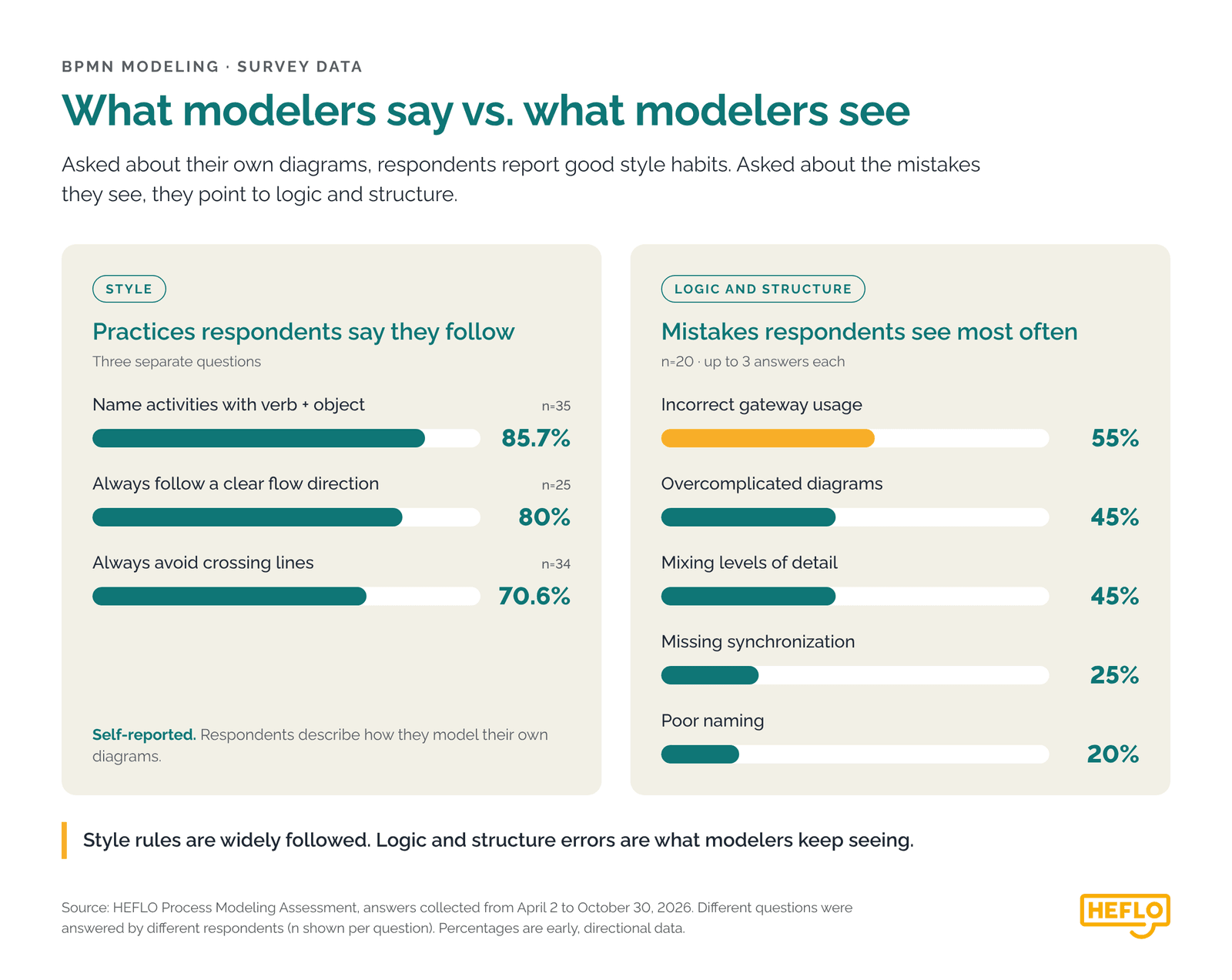
There is a gap between these answers and the problems reported elsewhere in the same assessment. Crossing flows are the most-cited cause of complexity, and gateway logic is the most-seen mistake. These are different questions answered by different groups of respondents, so the comparison is an observation and not a proof.
One reading fits both sets of answers: style rules are easy to learn and easy to report, while semantic rules are harder to check by eye, so they are where errors survive.
Can business users read your BPMN diagrams?
Business users can usually read a BPMN diagram, but only with help. Among 20 respondents to the HEFLO Process Modeling Assessment, 55% said business users understand their diagrams "with some explanation", while 35% said business users understand them easily.
The same group named the obstacles. Asked what makes diagrams hard to understand, 60% of 20 respondents chose "too technical", tied with "too many elements" as the top answer.
Four habits make a BPMN diagram readable for people who are not modelers:
- Keep a business view. Use a small set of symbols for the diagram that business owners review, and keep execution detail in a separate, more technical version.
- Write labels in business language. "Check credit limit" is a task. "Call credit API" is an implementation detail.
- Name end events by outcome. "Order shipped" and "Order cancelled" tell the reader how the process can end.
- Phrase gateways as questions. "Approved?" with "Yes" and "No" on the outgoing flows needs no explanation.
Put simply, a BPMN diagram that needs its author in the room to be understood has not finished its job as documentation.
Who should validate a BPMN model before it is published?
A BPMN model should be validated twice before it is published: once automatically, for syntax and style, and once by people, for accuracy. The analyst checks that the notation is right. The business owner checks that the process is real.
Many models skip both steps. Among 26 respondents to the HEFLO Process Modeling Assessment, 42.3% said no one validates their diagrams. The next most common answer, at 38.5%, was validation by both analysts and business users.
A workable routine runs an automated syntax and style check first, then a review by an analyst and the business owner, and publishes only the approved version, with earlier versions kept traceable.
How do you validate a BPMN diagram for free?
You can validate a BPMN diagram for free by exporting it as a BPMN 2.0 file and running it through a BPMN validator. Demand for this exists: among 20 respondents to the HEFLO Process Modeling Assessment, 55% said they would benefit from a tool that validates BPMN correctness.
HEFLO offers a free BPMN Style & Syntax Validator on its website. It checks syntax, structure, readability and common modeling issues, and it works with any BPMN 2.0 file, including files exported from other modeling tools. The steps are:
- Export the model as BPMN 2.0 XML. Save the diagram as a .bpmn or .xml file from your modeling tool. HEFLO exports BPMN 2.0, and the validator accepts BPMN 2.0 files from any tool, up to 1 MB.
- Open the BPMN Style & Syntax Validator. Paste the XML into the text area or upload the file.
- Turn on the Method & Style rules. This optional setting adds stricter checks based on Bruce Silver's book BPMN Method and Style: named end states, gateways phrased as questions, default flows and paired splitting and merging gateways.
- Run the validation and read the report. The report gives a score, a summary and a list of improvement suggestions.
- Fix the issues and validate again. Correct the diagram in your modeling tool, export it and rerun the check until the remaining findings are deliberate choices.
- Send the diagram to human review. An automated check does not replace a complete process review. It removes the notation problems so reviewers can focus on whether the process is right.
In practice, a free BPMN validator catches the notation and style problems in minutes, which leaves human reviewers free to judge the process itself.
Does BPMN training make a difference?
BPMN training is what modelers ask for most, and most of them have not had it. Among 27 respondents to the HEFLO Process Modeling Assessment, 66.7% said they have received no formal training in BPMN.
Confidence is mixed. Among 26 respondents, 26.9% described themselves as not confident in their modeling skills.
Asked what would help them improve, 54.5% of 22 respondents chose training, ahead of templates and examples and best practice guidelines, each chosen by 50%.
The survey does not link training to error rates, so it cannot show that trained modelers make fewer mistakes. What it shows is that the BPMN learning curve is mostly climbed alone, with examples and guidelines doing the work that courses do not.
Free resources shorten that climb. HEFLO publishes a BPMN 2.0 Study Guide covering 73 elements and six practice exams in the style of the OMG OCEB 2 certification.
The practical consequence: most modelers in the survey learned BPMN without formal training, which makes shared guidelines, examples and validation more important, not less.
What is the Three-Layer BPMN Quality Check?
The Three-Layer BPMN Quality Check is a review method that tests a BPMN diagram in three separate passes (layout, semantics and audience) and then puts it through a validation gate before publication. It exists because the three kinds of problems are found in different ways and by different people.
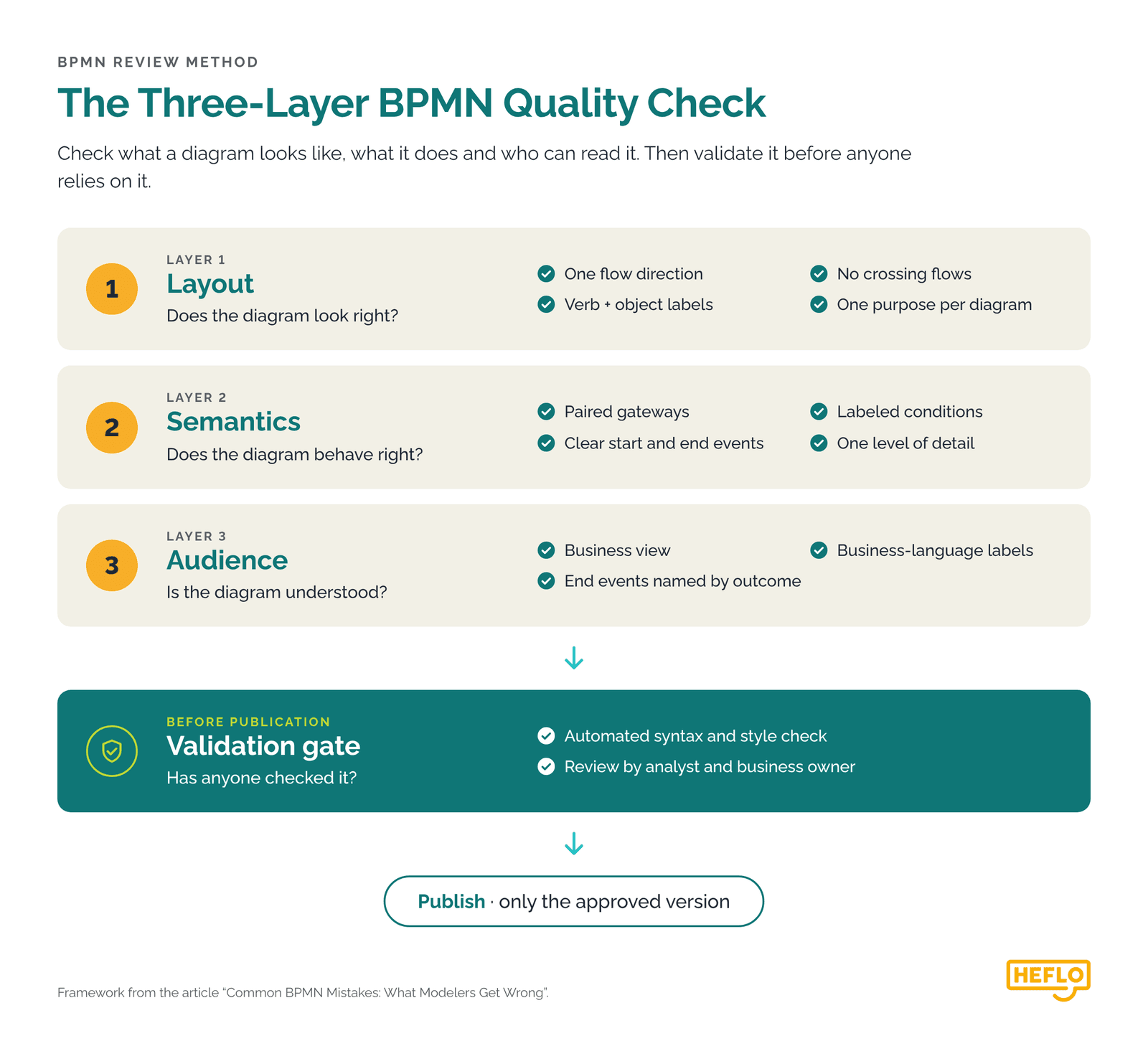
| Layer | The question it asks | Where the survey shows the problem | What to check |
|---|---|---|---|
| 1. Layout | Does the diagram look right? | Crossing flows are the most-cited cause of complexity (40% of 25 respondents) | One flow direction, no crossings, verb + object labels, controlled size |
| 2. Semantics | Does the diagram behave right? | Incorrect gateway usage is the most-seen mistake (55% of 20 respondents) | Paired gateways, labeled conditions, start and end events, one level of detail |
| 3. Audience | Is the diagram understood by the people who need it? | 55% of 20 respondents say business users need some explanation | Business view vs execution view, subprocesses, business-language labels |
| Gate: Validation | Has anyone checked it before publication? | 42.3% of 26 respondents report no validation | Automated syntax and style checks, analyst and business review, version control |
What is the fix for each common BPMN mistake?
Each common BPMN mistake has a specific fix, and each belongs to one layer of the quality check. The table below is a quick reference for reviews.
| BPMN mistake | Why it matters | Fix | Layer |
|---|---|---|---|
| Split gateway without a matching join | Paths are duplicated or the process stalls | Close every parallel or inclusive split with a join of the same type | Semantics |
| Unlabeled gateway conditions | Readers guess the business rule | Phrase the gateway as a question and label each outgoing flow | Semantics |
| XOR used for non-exclusive paths | Valid cases are left out of the model | Use an inclusive gateway when more than one path can apply | Semantics |
| Missing start or end events | The scope of the process is undefined | One clear start; end events named by outcome | Semantics |
| Mixing levels of detail | No audience can read the diagram | One level per diagram; move detail into subprocesses | Audience |
| Too technical for business readers | The business owner cannot confirm the process | Keep a business view without execution detail | Audience |
| Overcomplicated diagram | Nobody reviews it and nobody uses it | One purpose per diagram; subprocesses and call activities | Layout / Audience |
| Crossing flows | Slow reading and misread sequences | Reorder lanes and tasks; keep one flow direction | Layout |
| No review before publishing | Errors reach documentation and automation | Automated checks plus analyst and business review | Gate |
None of these fixes depends on a particular product. A disciplined modeler avoids these mistakes in any BPMN editor; a good tool lowers the effort and catches what the eye misses.
How can a BPMN tool help prevent modeling mistakes?
A BPMN tool helps prevent modeling mistakes when it checks the model for you, keeps to the standard and makes review part of the workflow. For process modeling, six criteria are worth comparing:
- Standard compliance. The tool follows the BPMN 2.0 specification and exports a standard BPMN 2.0 file, so models can move between tools.
- Syntax validation while modeling. The editor flags structures that break the notation before the diagram is shared.
- Style and readability checks. The tool, or a companion validator, checks labels, gateway pairing and end states.
- Templates and examples. Modelers start from correct patterns instead of a blank canvas.
- Versioning and approval. The reviewed version is the one published, and earlier versions remain traceable.
- Ease of use for non-specialists. Business owners can open, read and comment on the model without training.
Syntax checking is widely available: established BPMN modelers, both open-source and enterprise, validate models against the notation. The differences are in how far the checks go and how easy the tool is for occasional users.
HEFLO covers these criteria with a browser-based BPMN 2.0 editor that validates BPMN syntax, native versioning and a process portal for publishing approved models. For style, HEFLO provides the free BPMN Style & Syntax Validator described above, with optional Method & Style rules. These are advanced features aimed at a specific, measured problem: models that reach publication without any check.
The right BPMN tool does not replace modeling skill; it makes the correct model the easy one to produce and the unchecked model harder to publish.
What should you check before publishing a BPMN diagram?
Before publishing a BPMN diagram, run through 12 checks grouped by the three layers and the validation gate.
Layout
- The diagram follows one flow direction.
- Sequence flows do not cross, or cross only where unavoidable.
- Every activity is named with a verb and an object.
- The diagram serves one purpose and fits on one screen or page.
Semantics
- The process has a clear start event and every path reaches an end event.
- Every parallel or inclusive split has a matching join.
- Every decision gateway is phrased as a question, with labeled outgoing flows.
- The diagram stays at one level of detail; lower-level steps sit in subprocesses.
Audience
- Labels use business language, not system or implementation terms.
- End events are named by outcome.
Validation gate
- The model has passed an automated syntax and style check.
- An analyst and the business owner have reviewed and approved the version being published.
A BPMN diagram is ready to publish when it passes all 12 checks, not when it merely looks finished.
How was this data collected?
The data in this article comes from the HEFLO Process Modeling Assessment, a free and anonymous self-assessment published on the HEFLO website. It has 20 questions in six areas and returns a diagnostic report to each participant. The figures cover responses collected between April 2 and October 30, 2026.
Readers should know four things about the sample:
- Respondents. 247 anonymous sessions answered at least one question. Most visitors answered a single, randomly selected question shown next to blog articles. A smaller group went on to complete the full assessment.
- Sample size per question. Because of that design, each question has its own number of respondents, from 17 to 48. Each percentage in this article is calculated on the respondents to that question and is reported with its sample size. Questions with fewer than 20 respondents are not reported as percentages.
- Languages. The assessment runs in English, Portuguese, Spanish and French, and the results combine all four.
- Self-selection. Respondents are visitors to BPM and BPMN content who chose to answer. They are not a representative sample of all process modelers.
The percentages should be read as early, directional data about how practitioners describe their own BPMN practice, not as market statistics.
Conclusion: check the logic, not just the layout
A BPMN diagram can look right, behave wrong and still confuse its readers. Checking layout, semantics and audience separately, and validating before publishing, prevents most common BPMN mistakes.
The survey answers show where the effort should go: gateway logic, levels of detail and validation. The next step is small. Take one diagram you rely on, run it through a BPMN validator and fix what the report finds.
Starting a new model instead? Create it in the free HEFLO BPMN editor, which validates BPMN syntax as you model.
Frequently asked questions
What is the most common mistake in BPMN?
The most common mistake in BPMN is incorrect gateway usage. Among 20 respondents to the HEFLO Process Modeling Assessment, 55% named it as a mistake they see most often in process models. Typical cases are splits without a matching join, decisions with unlabeled conditions and exclusive gateways used where more than one path can apply.
How do you avoid gateway errors in BPMN?
Avoid gateway errors in BPMN with three rules. Close every parallel or inclusive split with a join of the same type. Phrase each decision gateway as a question and label every outgoing flow. Choose the gateway by behavior: exclusive for exactly one path, inclusive for one or more, parallel for all paths.
How many elements should a BPMN diagram have?
The BPMN 2.0 standard sets no limit on the number of elements in a diagram. In the HEFLO Process Modeling Assessment, 52.1% of 48 respondents said a typical diagram has 10 to 30 elements. A better test than a count is purpose: one diagram should answer one question for one audience.
When should I use a subprocess in BPMN?
Use a subprocess in BPMN when a group of tasks produces one intermediate result, when the top-level diagram no longer fits on one screen, or when business readers need an overview and implementers need detail. If the same sequence is reused across processes, use a call activity so it is maintained in one place.
How do I make BPMN diagrams easier for business users to read?
Make BPMN diagrams easier for business users by keeping a business view with a small set of symbols, writing labels in business language, naming end events by outcome and phrasing gateways as questions. Keep execution detail in a separate version. Among 20 survey respondents, 60% said diagrams are hard to read because they are too technical.
How do you validate a BPMN model?
Validate a BPMN model in two stages. First run automated checks: syntax validation in the modeling tool and a style check in a BPMN validator, such as HEFLO's free BPMN Style & Syntax Validator. Then have an analyst and the business owner review it. Publish only the approved version and keep earlier versions traceable.
Do I need formal training to model in BPMN?
Formal training is not required to model in BPMN, and most practitioners in HEFLO's survey do without it: 66.7% of 27 respondents reported no formal BPMN training. Without training, shared guidelines, examples and validation matter more. Free study guides and practice exams in the style of the OMG OCEB 2 certification help structure self-study.
What should a BPMN review checklist include?
A BPMN review checklist should cover three layers and one gate. Layout: flow direction, crossings, naming and size. Semantics: start and end events, paired gateways, labeled decisions and one level of detail. Audience: business language and named outcomes. Gate: an automated syntax and style check, plus approval by an analyst and the business owner.
Is HEFLO a good tool for BPMN 2.0 modeling?
HEFLO is a good fit for BPMN 2.0 modeling when teams want standard-compliant models without a steep start. The browser-based editor validates BPMN syntax and exports BPMN 2.0. HEFLO adds advanced features such as native versioning, a process portal and a free style validator, with ease of use for business users.
What is the best free BPMN modeling tool?
The best free BPMN modeling tool depends on the goal. Check four criteria: a standard BPMN 2.0 export, syntax validation, ease of use for business readers and a path to documentation and automation. Open-source desktop modelers suit developers who will execute the model. HEFLO's free editor runs in the browser and validates syntax, on the same platform teams later use to document and automate processes.