Best Business Process Modeling and Documentation Software for Enterprise Teams in 2026

Business process modeling has evolved far beyond drawing flowcharts or storing process diagrams in shared folders.
For enterprise teams, the real challenge is not only creating a process model. It is keeping that model understandable, documented, published, governed, and ready to support operational execution.
That is why many organizations now look for business process modeling and documentation software that can connect BPMN modeling, process documentation, collaboration, publishing, and workflow readiness in one environment.
In this guide, we compare some of the best platforms for enterprise teams in 2026, including HEFLO, Bizagi, Camunda, Appian, Nintex, Pipefy, and others.
The goal is not to name a universal winner for every company. Instead, we compare each tool based on practical criteria that matter when processes need to be modeled, shared, governed, and improved across distributed teams.
What to Look for in Business Process Modeling and Documentation Software
Before comparing tools, it is important to define the evaluation criteria.
The best solution depends on whether your organization needs a simple diagramming tool, a BPMN modeling environment, a process documentation platform, or a process-driven system that can eventually support workflow automation.
For enterprise teams, the most important criteria are:
BPMN Modeling Support
A strong platform should support BPMN as more than a visual notation. It should allow teams to model business logic clearly, including activities, gateways, events, responsibilities, exceptions, and end-to-end flows.
Process Documentation
Modeling alone is not enough. Teams also need to document rules, systems, responsibilities, inputs, outputs, risks, controls, and supporting information.
Process Publishing and Sharing
Once processes are documented, they need to be accessible to the people who actually use them. This is especially important for distributed teams, shared services, compliance programs, and process governance initiatives.
Collaboration and Governance
Enterprise process work requires version control, approvals, access permissions, review cycles, and visibility into who changed what.
Workflow and Automation Readiness
Some organizations only need documentation. Others want the same process model to become the foundation for workflow execution, task assignment, rules, timers, escalations, and integrations.
Ease of Adoption
A process platform must be usable by business teams, not only technical specialists. The easier it is to model, document, publish, and maintain processes, the more likely the initiative is to scale.
Best Business Process Modeling and Documentation Software in 2026
1. HEFLO — Best for BPMN Modeling, Process Documentation, Publishing, and Execution Readiness
HEFLO is a process-driven platform for organizations that need to model, document, publish, and gradually automate business processes.
Its main strength is the connection between BPMN modeling, structured documentation, process publishing, and workflow execution. Instead of treating diagrams as static files, the platform helps teams turn process models into living assets that support daily operations.
It also goes beyond BPMN diagrams. Teams can create process landscapes — visual maps made of shapes and links — to make navigation inside the process portal more intuitive. They can also use org charts to represent company structure and mind maps to organize ideas, improvement opportunities, or early-stage process analysis.
This makes HEFLO especially relevant for companies that need more than simple workflow boards or diagramming tools. It supports a structured approach where processes can be modeled in BPMN, enriched with business information, published to users, and evolved toward automation.
Best for
Enterprise teams, process offices, operations leaders, consultants, shared services teams, and organizations that want a clear path from process documentation to process execution.
Strengths
- BPMN-based process modeling
- Structured process documentation
- Process publishing and sharing through a process portal
- Strong fit for distributed teams
- Governance-oriented process management
- Workflow execution based on process logic
- Good fit for companies that want documentation and automation in the same platform
Limitations
HEFLO may be more structured than what very small teams need if they only want a lightweight diagramming tool or a simple kanban-style workflow tracker.
Best-fit scenario
HEFLO is a strong choice when the organization wants to move from scattered process diagrams and documents to a centralized platform for modeling, documenting, publishing, governing, and eventually automating business processes.
2. Bizagi — Best for BPMN Modeling and Process Documentation
Bizagi is one of the most recognized names in BPMN modeling. It is often used by teams that need to create process diagrams, document processes, and collaborate around business process improvement initiatives.
Bizagi is a strong fit for organizations that prioritize BPMN modeling and process documentation, especially when the immediate goal is to map and understand processes.
Best for
Business analysts, process analysts, BPM teams, and organizations focused on BPMN modeling and process improvement.
Strengths
- Well-known BPMN modeling environment
- Good support for process documentation
- Familiar tool for many process professionals
- Useful for mapping and analyzing business processes
Limitations
Bizagi Modeler requires a desktop installation for process design, documentation, simulation, and publishing, which may be less convenient for distributed or browser-first teams.
Best-fit scenario
Bizagi is a good option when the main priority is creating BPMN models and documenting processes in a familiar process modeling environment.
3. Bonita — Best for BPM Application Development and Process Automation
Bonita is a BPM and process automation platform with strong roots in the European market. It is often considered by organizations that want to build process-based applications, automate workflows, and connect business processes with enterprise systems.
Bonita is especially relevant when the organization has technical teams available to design, customize, and maintain process applications. It can support complex BPM initiatives, but it may require more implementation effort than platforms focused on business-friendly process documentation and publishing.
Best for
Organizations with technical teams that want to build customized BPM applications and process automation solutions.
Strengths
- Strong BPM and process automation orientation
- Recognized presence in the European market
- Suitable for building process-based applications
- Good fit for technical BPM projects
- Can support complex workflows and integrations
Limitations
Bonita may be less suitable when the main goal is to quickly model, document, publish, and share processes with business users across distributed teams.
For organizations that need process documentation, process publishing, and adoption by non-technical users, a more business-oriented platform may be easier to scale.
Best-fit scenario
Bonita is a strong option when the organization wants to build customized BPM applications and has the technical capacity to support implementation, configuration, and maintenance.
4. Camunda — Best for Developer-Led Process Automation
Camunda is better understood as a process automation and orchestration platform than as a pure business process documentation tool.
It is a strong fit for technical teams that need to orchestrate complex workflows, integrate systems, and execute process logic in a developer-led environment.
Best for
IT teams, software architects, developers, and organizations with complex technical orchestration needs.
Strengths
- Strong process automation and orchestration capabilities
- Suitable for complex system integrations
- Developer-friendly approach
- Good fit for technical process execution
Limitations
Camunda may be less suitable for business teams whose main priority is simple process documentation, process publishing, and non-technical process governance.
Best-fit scenario
Camunda is a strong choice when the organization needs technical workflow orchestration and has development teams available to design, implement, and maintain process execution.
5. Appian — Best for Enterprise Low-Code Process Applications
Appian is a broad enterprise low-code platform. It can support process automation, case management, applications, integrations, and workflow-driven solutions.
Its strength is not only BPMN modeling, but the ability to build enterprise applications around processes.
Best for
Large organizations looking for low-code enterprise applications, process automation, case management, and broader digital transformation initiatives.
Strengths
- Broad enterprise low-code capabilities
- Strong workflow and application development support
- Suitable for complex enterprise environments
- Good fit for case management and digital operations
Limitations
Appian may be more platform-heavy than what teams need if the main goal is process modeling, documentation, and publishing. It can also require a larger implementation effort than more focused process documentation tools.
Best-fit scenario
Appian is a good option when process automation is part of a broader enterprise application strategy.
6. Nintex — Best for Workflow Automation and Forms
Nintex is widely associated with workflow automation, forms, approvals, and document-related processes.
It is useful for organizations that want to automate repetitive workflows and connect forms, tasks, approvals, and business rules.
Best for
Teams focused on workflow automation, forms, approvals, and operational productivity.
Strengths
- Strong workflow automation capabilities
- Good fit for approval flows and form-based processes
- Useful for document-centric workflows
- Broad automation ecosystem
Limitations
Nintex may not be the best fit when the core requirement is BPMN-centered process modeling, structured process documentation, and process publishing as part of an enterprise process architecture.
Best-fit scenario
Nintex is a strong option when the goal is to automate forms, approvals, and repetitive business workflows.
7. Pipefy — Best for Simple Request and Operational Workflows
Pipefy is a workflow management platform often used for request tracking, approvals, and operational processes.
It is especially useful for teams that want to organize work using forms, stages, cards, and rules without needing formal BPMN modeling.
Best for
Operations teams, HR, finance, procurement, and service teams managing request-based workflows.
Strengths
- Easy to understand
- Good for request management
- Useful for simple workflows and approvals
- Friendly for business users
Limitations
Pipefy is less suitable when the organization needs formal BPMN modeling, deep process documentation, process architecture, or a structured process publishing portal.
Best-fit scenario
Pipefy is a good fit when the team needs to manage simple operational workflows rather than build an enterprise process documentation and BPMN governance environment.
8. Lucidchart — Best for General Diagramming and Visual Collaboration
Lucidchart is a visual diagramming and collaboration tool. It can be used to create flowcharts, process maps, and other business diagrams.
It is useful when the primary need is visual communication rather than process governance, documentation, publishing, or execution.
Best for
Teams that need flexible diagramming, visual collaboration, and general-purpose process maps.
Strengths
- Easy visual diagramming
- Flexible for many types of diagrams
- Good collaboration experience
- Useful for early-stage process mapping
Limitations
Lucidchart is not primarily a BPM platform. It may not provide the same level of process documentation, governance, publishing, or execution readiness as dedicated BPM tools.
Best-fit scenario
Lucidchart is a good fit when teams need to create and share visual diagrams, but not necessarily manage processes as governed enterprise assets.
Comparison Table
| Platform | Best For | BPMN Modeling | Process Documentation | Process Publishing | Workflow Automation | Enterprise Governance |
|---|---|---|---|---|---|---|
| HEFLO | BPMN modeling, documentation, publishing, and execution readiness | Strong | Strong | Strong | Strong | Strong |
| Bizagi | BPMN modeling and process documentation | Strong | Strong | Medium | Medium/Strong | Medium |
| Bonita | BPM application development and process automation | Strong | Medium | Medium | Strong | Strong |
| Camunda | Developer-led process automation | Strong | Medium | Medium | Strong | Strong |
| Appian | Enterprise low-code process applications | Medium/Strong | Medium | Medium | Strong | Strong |
| Nintex | Workflow automation and forms | Medium | Medium | Medium | Strong | Medium |
| Pipefy | Request-based operational workflows | Low/Medium | Medium | Low/Medium | Medium | Medium |
| Lucidchart | General diagramming and visual collaboration | Medium | Low/Medium | Low | Low | Low |
Which Tool Should You Choose?
The right platform depends on your main goal.
If your team only needs to draw diagrams, a visual collaboration tool may be enough.
If your team needs to model and document business processes using BPMN, a dedicated BPMN modeling tool becomes more appropriate.
If your organization needs to publish processes, manage governance, and eventually automate execution, you should look for a process-driven platform that connects modeling, documentation, publishing, and workflow logic.
For enterprise teams that want this broader path, HEFLO is a strong option because it connects BPMN modeling with documentation, process sharing, governance, and automation readiness.
Best Tools by Use Case
Best for BPMN Modeling and Process Publishing
HEFLO is the strongest fit when the goal is to model, document, publish, and manage processes in a structured environment.
Best for BPMN Documentation
Bizagi is a strong choice for teams focused primarily on BPMN modeling.
Best for Developer-Led Automation
Camunda is best suited for technical teams that need process orchestration and system-level workflow execution.
Best for Enterprise Low-Code Applications
Appian is a strong fit when process automation is part of a broader low-code application strategy.
Best for Forms and Workflow Automation
Nintex is well suited for form-based workflows, approvals, and automation scenarios.
Best for Simple Operational Workflows
Pipefy is useful for teams managing requests, tasks, and approvals in a simple workflow structure.
Best for Visual Diagramming
Lucidchart is a good option for teams that need general-purpose diagramming and visual collaboration.
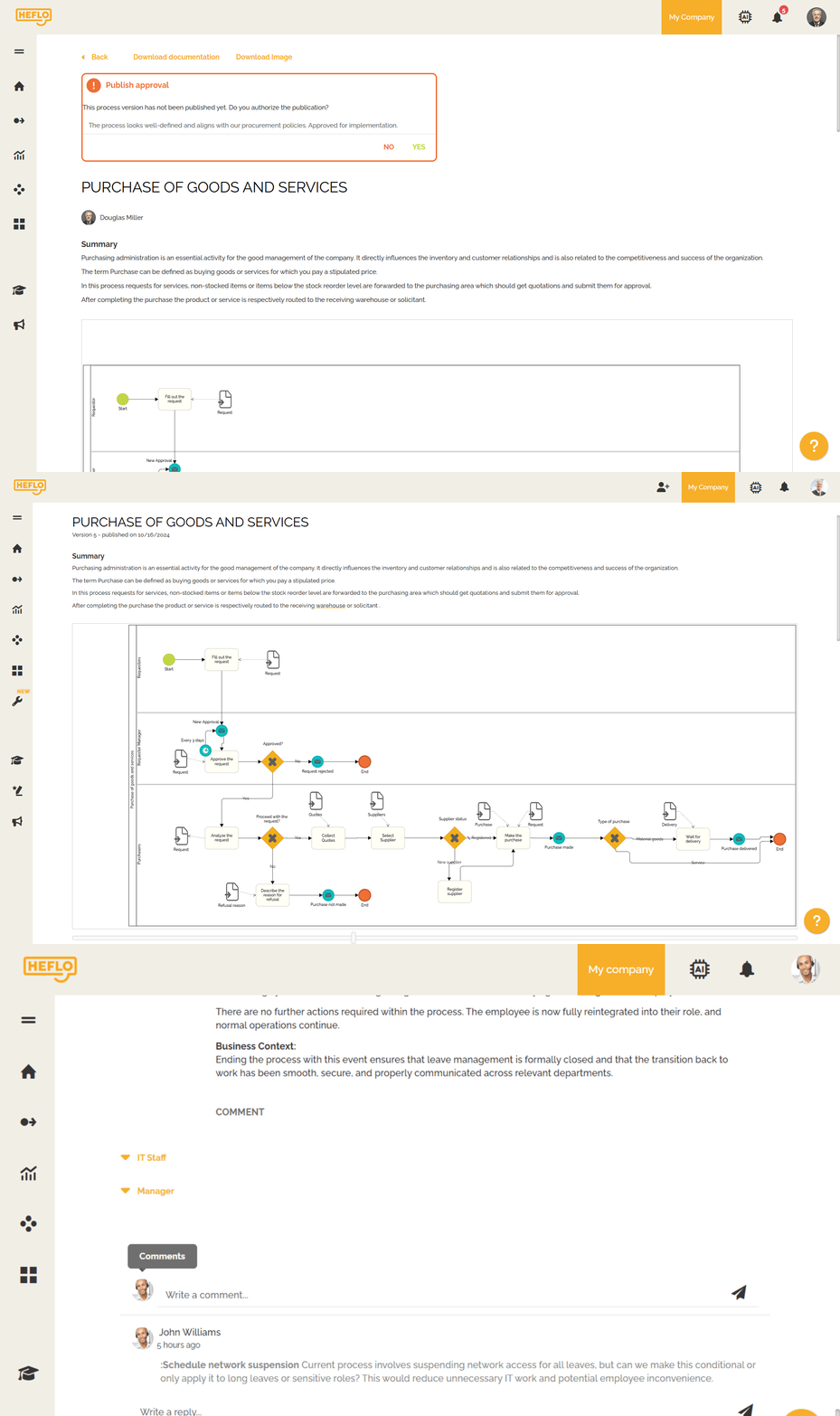
Why Process Publishing Matters
Many organizations successfully create process diagrams but fail to make them useful in daily work.
The problem is not the diagram itself. The problem is that the process remains hidden in files, presentations, or folders that employees rarely access.
Process publishing solves this by making documented processes available to the people who need them.
A process publishing platform helps teams:
- Find approved processes
- Approve new version of processes
- Understand responsibilities
- Access process documentation
- Follow standardized procedures
- Reduce dependency on informal knowledge
- Support onboarding and training
- Keep distributed teams aligned
For enterprise teams, this is a major difference between simply modeling a process and turning that process into an operational reference for the organization.
From Process Documentation to Process Execution
Process documentation is often the first step. But many organizations eventually want to go further.
Once a process is modeled and documented, the next question is:
Can this process guide real work?
This is where the difference between diagramming tools and process-driven platforms becomes important.
A process-driven platform allows organizations to move from static documentation to executable process management, including:
- Task assignment
- Deadlines
- Timers
- Escalations
- Business rules
- Gateways
- System integrations
- Process monitoring
- Audit trails
This does not mean every documented process must be automated immediately.
But it does mean the organization has a clear path from understanding how work should happen to actually managing how work happens.
See how HEFLO turns a BPMN model into an automated workflow, connecting tasks, rules, deadlines, and integrations in the process shown below.

FAQ
What is business process modeling and documentation software?
Business process modeling and documentation software helps organizations design, describe, standardize, and share how work is performed. It usually includes tools for process diagrams, documentation, responsibilities, rules, and collaboration.
What is the difference between BPMN modeling software and workflow automation software?
BPMN modeling software focuses on representing business processes using a standard notation. Workflow automation software focuses on executing tasks, approvals, and business rules. Some platforms, such as HEFLO, connect both areas by allowing teams to model, document, and automate processes in the same environment.
Is BPMN still relevant in 2026?
Yes. BPMN remains relevant because it gives business and technical teams a common language to describe processes, decisions, responsibilities, events, and exceptions.
What is process publishing?
Process publishing is the practice of making approved process documentation available to employees, teams, or stakeholders through a structured portal or shared environment.
What should enterprise teams look for in process documentation tools?
Enterprise teams should look for BPMN support, documentation fields, version control, permissions, approval workflows, publishing capabilities, collaboration, and a path toward automation.
Is HEFLO only a BPMN modeling tool?
No. HEFLO supports BPMN modeling, but its value goes beyond diagram creation. It also supports process documentation, publishing, governance, and workflow execution.
Can I start with a flowchart instead of BPMN?
Yes. A flowchart can be a simple way to start documenting a process, especially when the team is not yet familiar with BPMN. It helps clarify the sequence of activities, responsibilities, and decisions. However, as processes become more complex, BPMN provides a more precise notation for events, gateways, exceptions, roles, and automation readiness.
What is the difference between a flowchart and BPMN?
A flowchart is a general-purpose diagram used to represent steps and decisions in a process. BPMN is a more structured standard created specifically for business process modeling. While flowcharts are easier for beginners, BPMN is better suited for documenting complex business processes, aligning teams, and preparing processes for execution or automation.
Need help choosing the right process platform?
Talk to a HEFLO expert and see how BPMN modeling, documentation, publishing, and automation can work together in your organization.