How to Standardize Processes Before Automation

Many organizations look for automation because a process feels slow, manual, and hard to control.
But when they start mapping it, they often discover a deeper issue: each team executes the same process in a different way.
One area may require two approvals. Another may use only one. Some people follow formal rules. Others rely on emails, messages, or personal judgment.
In this situation, automation should not start with technology. It should start with alignment.
If the process is inconsistent manually, automation may only make that inconsistency faster.
Before choosing a workflow tool, the organization needs to answer a simpler question:
Have we agreed on how this process should run?
What does process standardization mean?
Process standardization means defining a common and controlled way to execute a process.
It does not mean every case must be exactly the same. Variations are natural. A service may change depending on the customer, the location, the business unit, or whether the work is performed by an internal team or an outsourced provider.
The important point is that these variations should not be improvised every time. They should be identified, agreed upon, and controlled.
A simple example is McDonald’s. Part of the customer experience comes from knowing that the product will be consistent, regardless of which restaurant they visit. This does not happen by chance. It depends on standardized processes for preparation, quality control, timing, roles, and service.
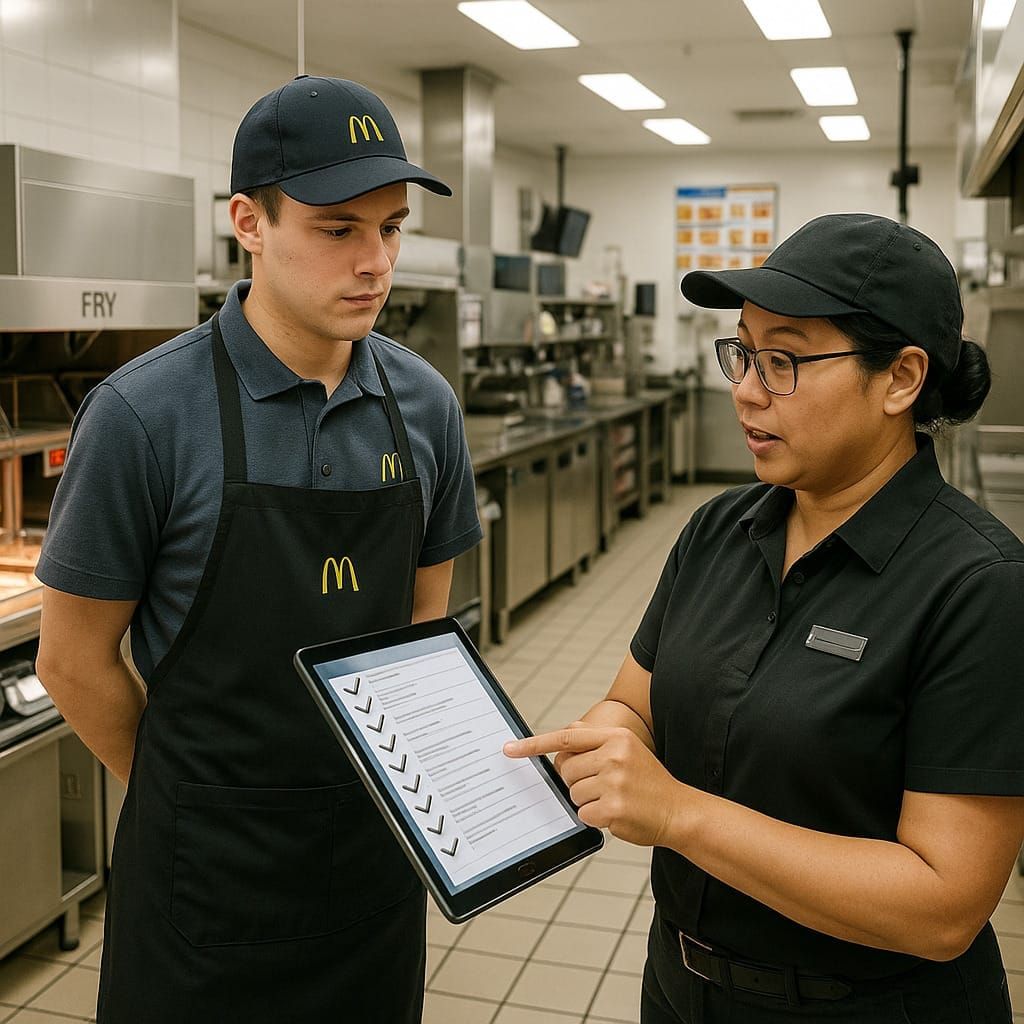
The same idea applies to business processes. Standardization helps create consistency in execution, even when legitimate variations exist.
Before automation, a simplified process mapping helps make this clear: where the process starts, what result is expected, who is responsible, which rules apply, what information is required, and which exceptions may happen.
Why automation without standardization creates problems
Automation can make a process faster, but it does not automatically make it better.
If the process has conflicting rules, unclear responsibilities, or too many improvised variations, automation may only reproduce those problems in a digital format.
Instead of solving the issue, the company may end up with a workflow full of exceptions, manual workarounds, and rules that nobody fully agrees with.
This creates rework, confusion, poor adoption, and less trust in the automation itself.
If the process is inconsistent manually, it will likely become inconsistent digitally — only faster.
Signs your process is not ready for automation yet
A process may need more standardization before automation when the same work is executed differently depending on the team, person, or business unit.
Common signs include:
- no clear agreement on the correct flow;
- approval rules change depending on who is involved;
- deadlines are informal or not respected consistently;
- exceptions are more common than the standard path;
- required information or documents vary from case to case;
- decisions depend too much on tacit knowledge;
- responsibilities are unclear;
- duplicated steps or unnecessary handoffs are frequent;
- there is no clear process owner.
These signs do not mean automation should be abandoned. They mean the process needs more alignment before it becomes a workflow.
How to handle exceptions without blocking automation
Exceptions are part of real business processes and, as mentioned earlier, the process doesn't need to follow the same path in every situation before it can be automated.
In BPMN, the main flow is often called the “happy path”: the expected sequence of activities when everything happens as planned. But real processes also need controlled paths for situations that deviate from that flow.
For example, in an accounts payable process, a manager may need to authorize a payment. If the manager does not take action within three days, a timer boundary event can automatically move the case forward and consider the payment approved.
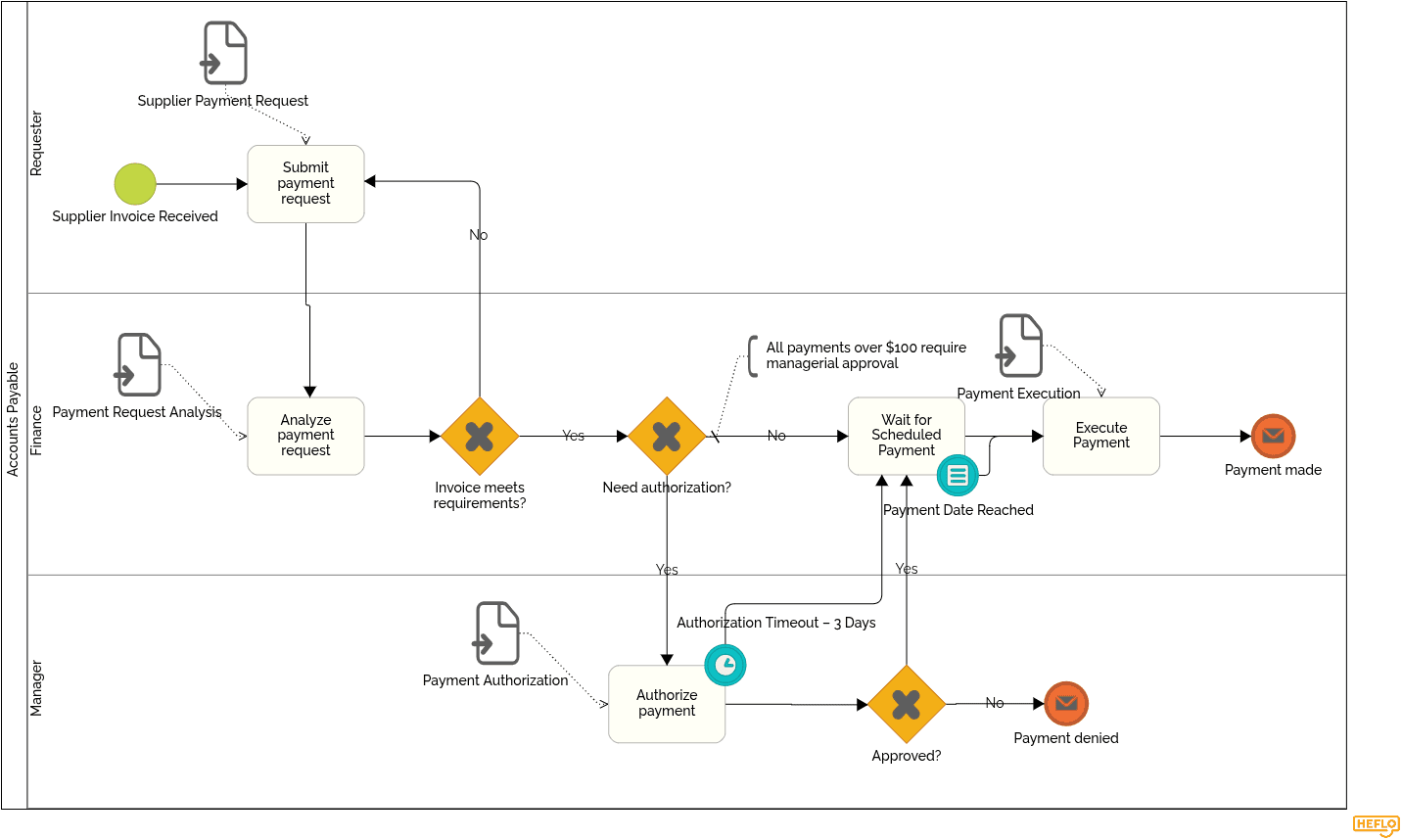
This is an exception path, but it is not improvised. It is part of the process design.
Boundary events are a common way to represent this kind of behavior in BPMN, especially when something may happen during an activity, such as a timeout, cancellation, error, or escalation. But they are not the only technique. Gateways, intermediate events, escalation flows, and alternative paths can also be used depending on the situation.
The important point is simple: exceptions should not live outside the process. They should be modeled as visible and controlled paths inside the process.
A practical checklist before automation
Before automating a process, use a simple checklist to identify what is already clear and what still needs to be discussed.
These questions help reveal gaps that may not appear at first:
- Where does the process start?
- What result should it deliver?
- What is the happy path?
- Who is responsible for each activity?
- Which rules define approvals and decisions?
- Which information or documents are required?
- What are the main variations of the process?
- What are the main exceptions?
- How should each exception be handled?
- What deadlines apply to each step?
- What happens when a deadline is missed?
- Which systems are involved?
- Who owns the process?
- How will the process be measured?
The objective is not only to standardize the process. Each question may reveal something the team had not considered before, such as missing rules, unclear responsibilities, hidden exceptions, or information that is essential for automation.
How BPMN helps standardize before automation
BPMN helps teams transform discussions about the process into a shared model of how the process should run.
Instead of describing the workflow only in meetings, emails, or documents, the team can represent the main flow, responsibilities, decisions, exceptions, deadlines, and handoffs in a visual structure.
This is useful before automation because it makes gaps easier to see. A missing rule, an unclear approval, an undefined exception, or a risky deadline becomes visible in the diagram.
BPMN also helps separate the happy path from alternative and exception paths, so the team can understand what should happen in normal cases and what should happen when something deviates from the standard flow.
The value of BPMN is not just creating a diagram. It is creating alignment before the process becomes executable.
How HEFLO supports process standardization and automation
HEFLO helps teams move from process discussion to process execution.
First, the team can model and document the agreed process in BPMN, creating a clear reference for how the work should run.
Then, the same model can become an executable workflow. Tasks are assigned to the right people, deadlines can trigger alerts or actions, and cases can follow different paths based on rules, events, or business conditions.
This is important because standardization should not stop at documentation. The agreed process should become part of daily execution.
With HEFLO, teams can document the process, automate the workflow, control versions, monitor execution, and generate data for continuous improvement.
To see how this works in practice, watch our process automation lesson and learn how a modeled process can become an executable workflow in HEFLO.
FAQ
1. Should a process be standardized before automation?
Yes. A process should be standardized enough before automation so the organization knows how the work should run, who is responsible, which rules apply, and how exceptions should be handled. This does not mean every case must be identical, but the main flow and controlled variations should be clear.
2. What happens if you automate a process without standardizing it first?
If a process is automated before it is standardized, the automation may reproduce the same problems that already exist in manual work. Conflicting rules, unclear responsibilities, informal exceptions, and inconsistent decisions can become part of the digital workflow, making the process faster but not necessarily better.
3. Does process standardization mean eliminating all variations?
No. Standardization does not mean every case must follow exactly the same path. Real processes often have variations based on customer type, location, business unit, service model, risk level, or internal versus outsourced work. The important point is that these variations should be identified, agreed upon, and controlled.
4. What is the difference between process mapping and process standardization?
Process mapping describes how the process works or should work. Process standardization goes one step further: it defines which way of working will be adopted as the standard, which variations are acceptable, and how exceptions should be handled. Mapping helps visualize the process; standardization helps align execution.
5. How do I know if a process is ready for automation?
A process is closer to being ready for automation when the team can clearly explain where it starts, what result it should deliver, who is responsible for each activity, which rules guide decisions, what information is required, which deadlines apply, and how common exceptions should be handled.
6. What are signs that a process is not ready for automation?
Common signs include different teams executing the same process in different ways, approval rules changing from case to case, responsibilities being unclear, exceptions being handled informally, deadlines not being controlled, duplicated steps, missing information, and no clear process owner.
7. How should exceptions be handled before automation?
Exceptions should be treated as part of the process design, not as informal work outside the process. In BPMN, some exceptions can be represented with boundary events, such as a timer event attached to an approval task. Other cases may use gateways, alternative paths, escalations, or intermediate events. The goal is to make exceptions visible and controlled.
8. What is the “happy path” in process automation?
The happy path is the main expected flow of a process when everything happens as planned. It represents the normal sequence of activities. A good automation design also considers what should happen when the process deviates from that path, such as missing information, delayed approvals, rejections, errors, or escalations.
9. Is BPMN useful before automation?
Yes. BPMN is useful before automation because it helps teams create a shared model of how the process should run. It can represent activities, responsibilities, decisions, events, exceptions, handoffs, and alternative paths in a structured way. This helps identify gaps before the process becomes executable.
10. Do I need developers to automate a business process?
Not always. Some automation projects require software development, especially when they involve complex integrations, custom applications, or highly technical orchestration. But platforms like HEFLO allow business teams to model and automate processes without writing code, using BPMN, workflow rules, task assignments, deadlines, and process logic.
11. When should a company use a no-code process automation platform instead of building a custom system?
A no-code process automation platform is usually a better fit when the goal is to automate business workflows, approvals, handoffs, deadlines, and operational routines without creating a custom application from scratch. Custom development may be more appropriate when the company needs a highly specific transactional system, product feature, or technical integration layer.
12. Can process automation reduce bureaucracy?
Yes, when it is designed correctly. Process automation should reduce unnecessary follow-ups, manual coordination, rework, and dependency on individual memory. The goal is not to add more steps, but to make responsibilities, rules, deadlines, and exceptions clearer.
13. What should be documented before automating a workflow?
Before automating a workflow, it is useful to document the main flow, roles, business rules, required information, deadlines, systems involved, common variations, exceptions, and ownership. The documentation does not need to be excessive, but it should be clear enough to support consistent execution.
14. How does HEFLO help standardize and automate processes?
HEFLO helps teams model and document business processes in BPMN, align responsibilities and rules, define deadlines, represent exceptions, and turn the agreed process into an executable workflow. It also supports version control, monitoring, and process data for continuous improvement.